Many eCommerce businesses have created websites to sell their products. But only a few rank well on Google. Most websites could improve their results by avoiding some common eCommerce SEO mistakes.
Some use the wrong keywords. Some neglect user experience. And many even publish low-value content. These mistakes ruin the user experience and reduce engagement.
Highlights
- Keyword Research & Intent Mapping: Avoid targeting generic terms like “shoes” or “jackets” that yield high volume but low conversion rates. Instead, focus on long-tail keywords with buyer intent (e.g., “brown formal shoes”) and map keywords strategically—informational for blogs, navigational for categories, and transactional for product pages.
- Site Structure & Technical Foundation: Implement a shallow hierarchy, keeping important pages within three clicks of the homepage, as pages deeper than this are 75% less likely to be crawled frequently. Use customer-friendly category labels and maintain clean sitemaps with proper product schema markup.
- Image & Page Speed Optimization: Compress and resize product images, use modern formats, write descriptive alt text, and enable lazy loading to improve Core Web Vitals. Every extra second of load time increases bounce rates up to 32%, directly impacting both rankings and conversions.
- Content Quality & Duplicate Prevention: Replace thin manufacturer descriptions with unique, benefit-focused copy that includes FAQs, reviews, and comparison tables. Use canonical tags and parameter handling to consolidate duplicate URLs created by filters and variants, preventing diluted link equity.
- Internal Linking & User Experience: Build a strategic internal linking structure connecting related products, categories, and blog-to-product pathways to improve crawlability and guide customers toward purchases. Streamline checkout processes, ensure mobile usability, and reduce friction points that cause cart abandonment.
Top 9 eCommerce SEO mistakes that negatively affect your website
Here are nine common eCommerce SEO mistakes to avoid.
1. Ignoring keyword research
Many stores skip in-depth keyword research and rely on instinct. That causes pages to target phrases buyers rarely use. As a result, you then end up with traffic that doesn’t convert.
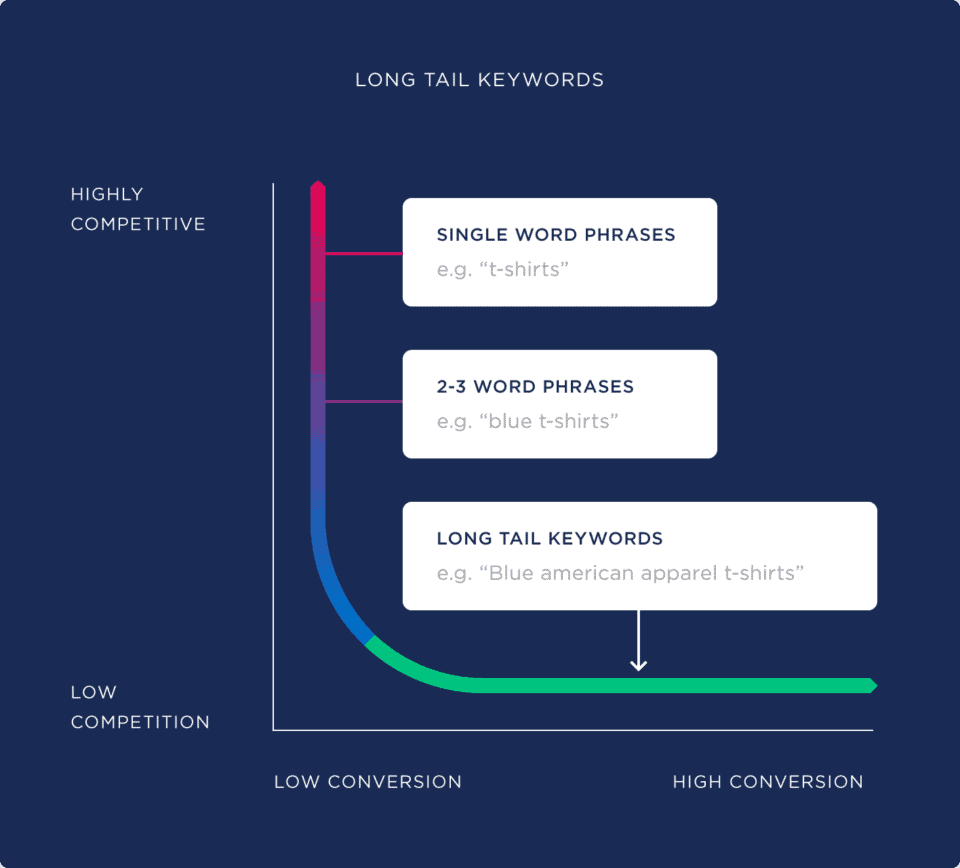
General terms like “shoes”, “jackets”, and “wallets” may bring volume but not buyers. Whereas long-tail queries, like “brown formal shoes”, “affordable black leather jackets”, and “leather wallets for sale” often show buyer intent.
Without mapping intent to pages, you answer the wrong questions and waste effort on the wrong audiences. For instance, use informational keywords in blog posts and guides. Use navigational keywords for category or hub pages. Use transactional keywords on product and service pages.
Keyword neglect also fragments your site. Teams add tags and categories without coordination. Metadata becomes inconsistent. Paid campaigns bid on mismatched terms.
That raises customer acquisition cost (CAC) and lowers profit. A clear keyword plan aligns product and category pages with real buyer behavior.
How to resolve it?
Fortunately, you can easily solve the issue. For that, you don’t need hours of work.
Instead, you just need a clear strategy.
Here’s how you can find and target the right keywords:
- Intent Map: Group keywords into informational, comparison, and buy intent, and link each group to suitable pages.
- Volume vs. ROI: When you find keywords, search for the terms that bring a better return-on-investment, not irrelevant traffic.
- Long-Tail Targeting: Use long-tail keywords that mention various aspects, such as size, color, region, and other relevant details.
- Competitor Gaps: Select keywords with significant potential and lower competition.
- Content Funnel: Let blog posts direct users to product pages, guiding them from research to buy.
2. Poor site structure
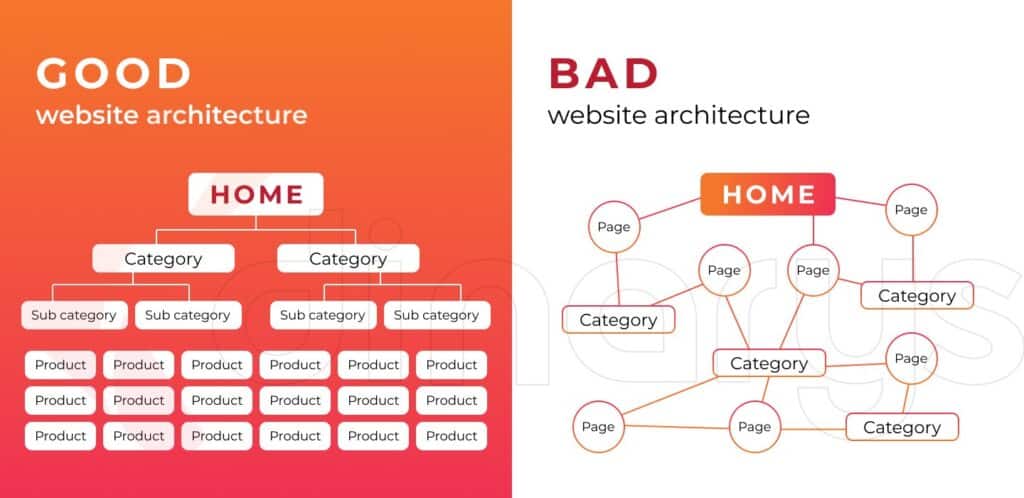
A messy site layout buries your best products. Deep category trees and vague labels make navigation hard for both users and crawlers. Pages that are three or more clicks away from the homepage are 75% less likely to be crawled frequently (Source: Ranktracker). That reduces link flow and lowers index priority.
When search engines can’t find or weigh pages easily, rank potential drops. Remember, pages within three clicks can also reduce users’ effort and improve the experience (Source: Semrush).
Poor structure also hurts shoppers. If categories have odd names such as “footwear solutions”, “apparel essentials”, and “vision wear”, users struggle to find products quickly and often leave. That sends negative engagement signals. Hence, you lose both search value and conversions when the taxonomy stays unclear.
Using well-organized admin templates can help maintain a clear taxonomy, consistent labeling, and a logical structure—ensuring both users and search engines can navigate your site efficiently.
How to resolve it?
Design a shallow, predictable hierarchy. Use customer-friendly labels and make pages easy to reach and link to. Moreover, make sure to consider these simple things:
- Three-Click Rule: Keep major pages within three clicks of the homepage to make them easier to discover and navigate.
- Shopper Labels: Name categories with words customers use when searching to reduce confusion and returns.
- Sitemap Priority: Create a well-structured sitemap that prioritizes top categories.
- Related Linking: Interlink related pages to share authority and help users quickly find associated products.
3. Lack of image optimization
When it comes to optimization, never neglect your images. Yes, images play a crucial role in bringing traffic and converting potential buyers. Images strongly influence UX and conversions. Always optimize all product images.
Images sell products, but large files can slow down performance. Many stores upload original camera files, which slows the site. Some don’t write alt text or choose irrelevant file names. You must not make any of these mistakes. If you do so, your images might not help you rank on search engines and impress visitors.
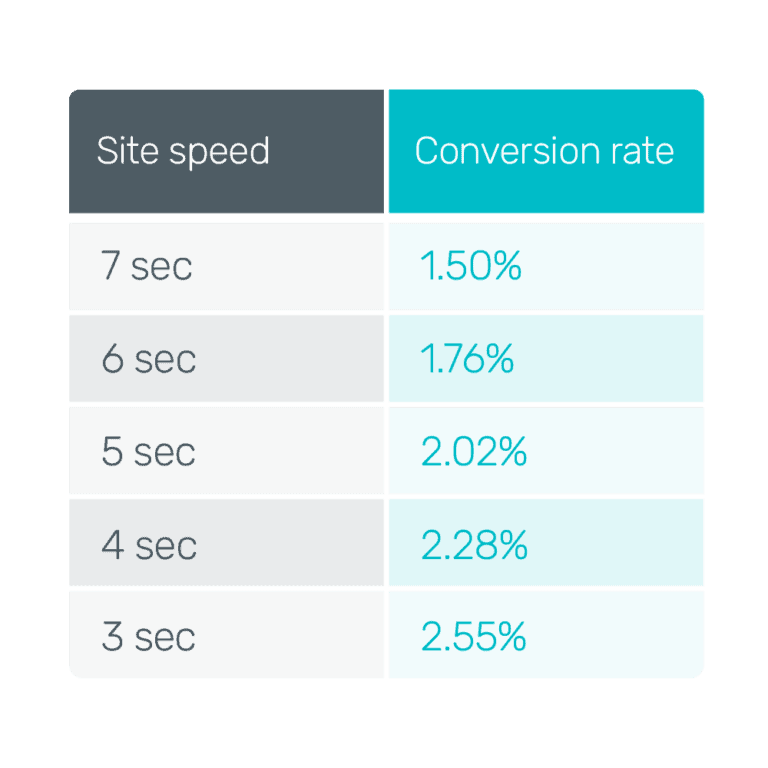
Search engines use visual signals too. When images load slowly, users tend to leave. In fact, slow loading times increase bounce rate by up to 32% (Source: Hostinger). That hurts ranking metrics and conversion chances. Treat images as content that must both load quickly and clearly convey the product’s essence.
How to resolve it?
Optimizing visual content is no longer difficult. In fact, it’s a matter of a few minutes. But you need to know how to do it properly.
Here are some practical tips for image optimization:
- Make them Responsive: Resize images for all devices, including desktops and mobile.
- Choose Modern Formats: Avoid posting images in non-standard image formats. Instead, convert them to the most widely recognized, universal formats to improve visibility.
- Write Descriptive Alt Text: Write concise alt text that explains the product type and key attributes for users and bots.
- Optimize Filenames: Optimize your filenames as well. For instance, instead of “IMG 01,” write “Black Leather Shoes.”
- Compress Images: Compress photos to reduce loading time.
- Lazy Load Images: Enable lazy loading so images load only when users scroll to them.
4. Slow page loading speed
Core Web Vitals, including Largest Contentful Paint (LCP) and Cumulative Layout Shift (CLS), measure the real user experience. Pages that load slowly gradually lose visibility over time.
For eCommerce sites, heavy product images, unoptimized themes, and multiple third-party scripts often delay rendering. And every extra second adds friction, leading visitors to abandon the cart or press the back button.
How to resolve it?
Measure real-user metrics and remove the largest blockers. Focus on both server and client improvements.
Let’s learn how you can fix the issue:
- Track Performance: Analyze how real users experience your website through Core Web Vitals. And identify key speed-related issues.
- Focus on Visual Styling: Keep the CSS for what people should see first and delay the rest. It helps the page show up faster.
- Use a Reliable CDN: Don’t pick any random CDN for your website. Choose one known for its speed and dependability.
5. Neglecting user experience
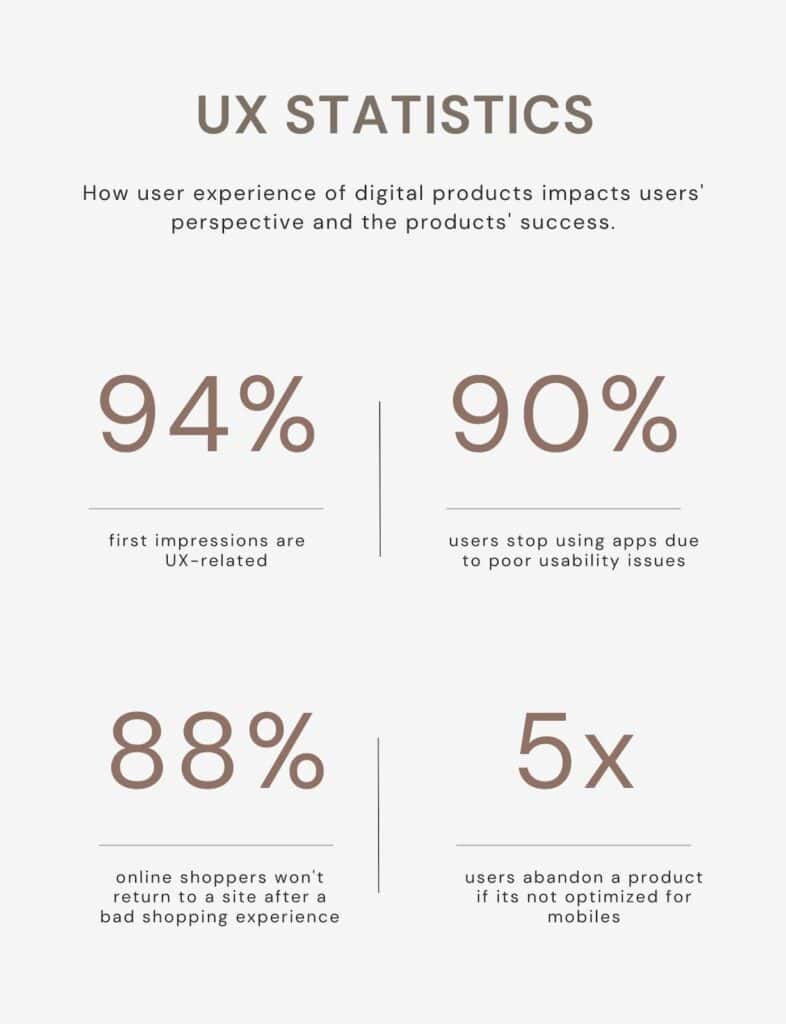
Search draws users; experience converts them. Bad UX, like confusing menus, weak product details, or friction at checkout, kills conversions faster than poor traffic. When users struggle, they leave and do not return. That behavior sends negative signals to search engines and reduces potential rank.
A focused UX improves confidence and reduces returns. Clear product guidance, strong microcopy, and visible trust markers shorten decision time. Better UX indirectly helps SEO by improving engagement, and it immediately impacts sales.
How to resolve it?
To enhance user experience, follow these steps:
- Shorten checkout paths: Minimize form fields, keep payment options visible. And let guests order without login barriers.
- Optimal mobile usability: Use bold, finger-friendly buttons and ensure text and menus adapt seamlessly across devices.
- Focus on Benefits: Prioritize benefits over features or technical information about your products.
- Refine Site Search: Enhance search accuracy by handling typos, providing auto-complete, and suggesting related terms to improve product discovery.
6. Duplicate content issues
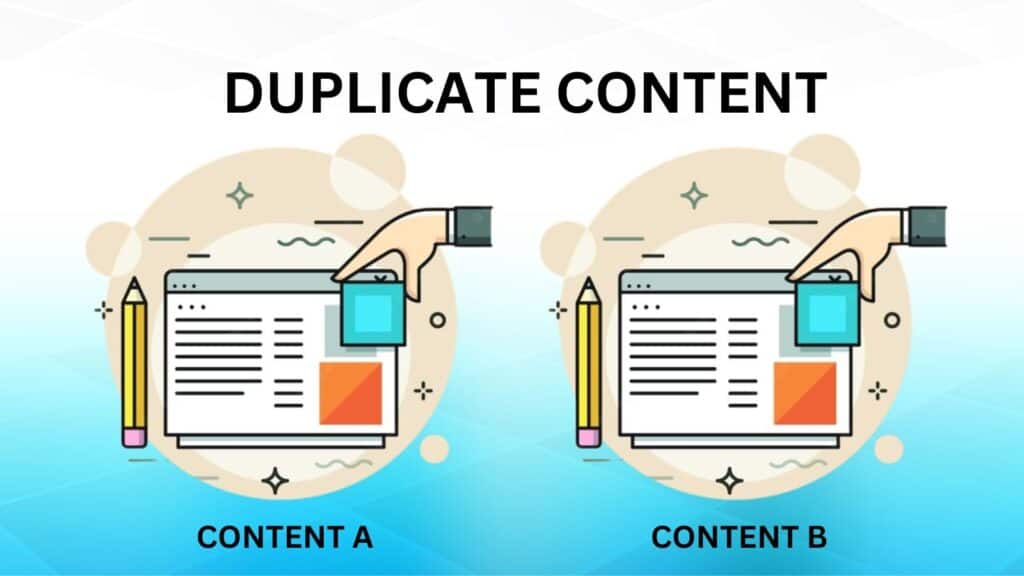
Filters, sorting, and variant URLs often create duplicate pages. For instance, a single pair of shoes might appear under multiple filter combinations, generating several URLs with the same content. When search engines encounter these duplicates, they struggle to determine which page is correct. That dilutes link equity and hurts ranking across the set.
Duplicate content also confuses crawlers. They find it hard to index your site efficiently, which wastes crawl budget and slows overall website performance.
Additionally, it confuses users who land on different versions of the same item. Moreover, backlinks are distributed across URLs rather than concentrated on a single canonical page. As a result, your website fails to perform as expected.
How to resolve it?
Consolidate duplicates and control indexation to preserve authority and reduce crawl waste.
Moreover, consider these points to avoid the duplicate content issue:
- Canonical Tags: Point duplicate pages to the main URL to concentrate ranking signals and avoid split authority.
- Noindex Low-Value Pages: Mark printable pages or many filter results as noindex to reduce index bloat.
- Parameter Handling: Use Search Console to instruct Google on how to handle query parameters and prevent redundant crawling.
- Unique SKU Content: Replace manufacturer copy with original descriptions and unique selling points for each SKU.
- Merge Thin Pages: Consolidate similar low-traffic variants into a single, stronger page with variant options.
- Pagination Controls: Use rel=”next/prev” or canonical choices to keep sequence pages from competing.
7. Ignoring technical SEO
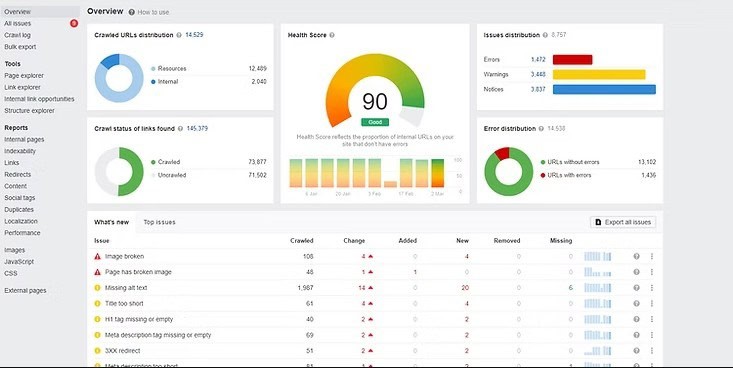
Technical SEO ensures search engines can properly access, understand, and index your eCommerce store’s pages. Regardless of the type of website you have, never neglect it. It enables your website to function as search engines expect.
And when your website’s sitemaps break or schema is missing, search engines fail to find the relevant information regarding your pages.
If product price markup breaks, your rich snippets disappear, and CTR falls. Redirect loops and server errors scatter link equity and break user journeys.
Technical debt erodes the benefits of content and links. Clean fundamentals first so content and outreach can scale without being blocked by indexing or crawl issues.
How to resolve it?
Yes, technical SEO requires skills and experience. Still, it’s not that difficult. If you want to improve it, consider these things:
- Run Audits: Conduct comprehensive audits on your website to identify all SEO-related errors.
- Clean Sitemaps: Regularly update your sitemaps and only list indexable pages on them.
- Add Schema: Mark up products with price, availability, and reviews to improve SERP presence and CTR.
- Hreflang Checks: Ensure hreflang tags are correct for regional content to prevent duplicate international pages and mismatches.
8. Thin, unclear, and low-value content
Unclear or hard-to-understand content doesn’t help anyone. So, every word you write must be understandable for your readers. You can use a free paraphrasing tool to improve your content.
When you paraphrase with such a tool, you refine sentences, enhance flow, and reduce redundancy. Together, these elements enhance clarity and make your text more helpful for readers.
How to resolve it?
Content is the backbone of your website. So, never compromise on content.
Below are some helpful tips to enhance content quality:
- Write Benefit-Led Copy: Prioritize your product’s benefits over features.
- Add Short FAQs: Addressing frequent questions helps you earn visitors’ confidence and boost sales. So, never skip them.
- Show Reviews and UGC: To earn trust, add user-generated content (UGC) reviews on your product pages.
- Create Comparison Tables: Help buyers make informed choices by listing clear trade-offs and use cases.
- Standardize Templates: Ensure each product page includes the required blocks, such as features, benefits, and sizes.
- Merge Weak Pages: Combine low-value pages into stronger resources that better serve search engine users.
9. Weak internal linking strategy
Internal links may appear small, but ignoring them can hinder an eCommerce site. Many stores launch dozens of categories and hundreds of product pages without connecting them.
The result: essential pages stay hidden, collect little authority, and fail to rank, even when the products are excellent. Search engines discover and evaluate pages by following links.
When links are missing or disorganized, crawlers can’t navigate your site correctly. That lowers visibility. And keeps your top pages from getting the attention they deserve.
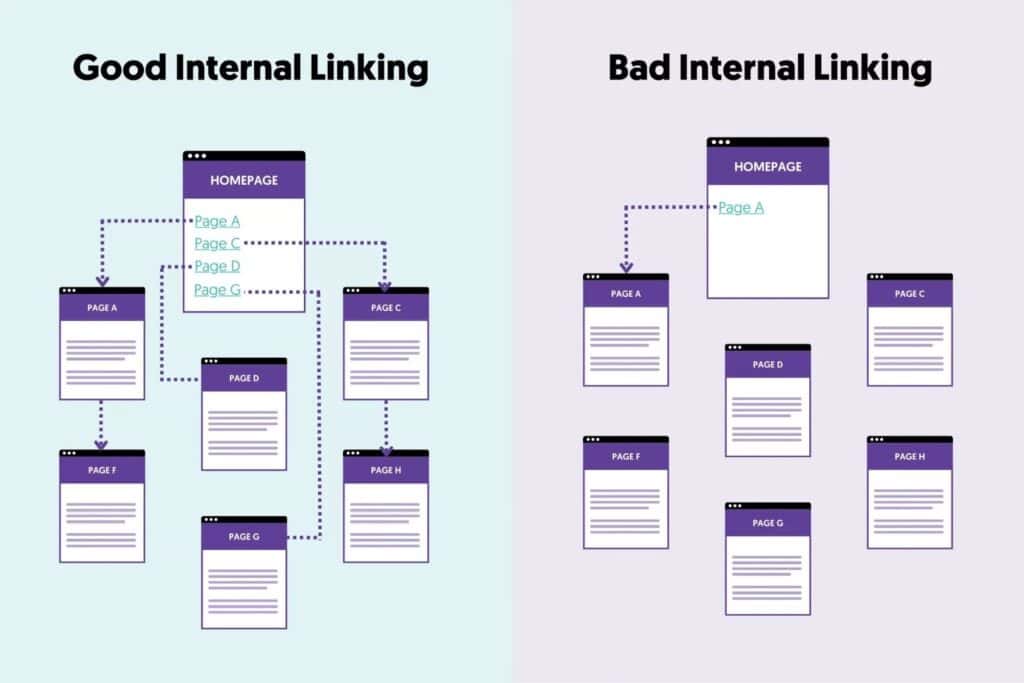
Without logical links, shoppers can’t easily discover alternatives, bundles, or complementary items. They land, don’t explore, and leave, raising bounce rates and killing conversions. Internal links aren’t for bots; they guide real people toward buying decisions.
How to resolve it?
A clear internal linking plan improves both crawlability and customer journeys.
Try these simple fixes:
- Link Related Products: Surface alternatives and complementary items.
- Add Breadcrumbs: Make hierarchy easy to follow for users and bots.
- Point Blog Posts to Product Pages: Use content to drive conversions.
- Audit Links: Fix broken links and maintain a consistent structure.
Conclusion
Fixing these issues unlocks real gains. Start with site structure, page speed, and keyword alignment. Then focus on technical cleanup and content depth. Rely on your data to decide what deserves attention first. Then work in short, concentrated rounds on key templates or major categories.
Watch how those changes perform, adjust your plan as needed, and continue to improve. Minor, steady refinements build momentum. For instance, you get fewer duplicates, faster pages, more precise product details, and a smoother checkout, which together lift both conversions and organic traffic.
Put in the effort, review what’s working, and keep sharpening your approach. Eventually, your store will achieve more search visibility. And turn more visitors into paying customers.
If you want to turn eCommerce SEO mistakes into growth opportunities, then let our experts help you with Enterprise SEO, Link Building, Content Writing, and more. Book a call with us today to discuss how uSERP can help your brand rank higher and attract buyers!