If you’ve been comparing Perplexity AI vs ChatGPT, stop your research and read this piece instead. I’ve gone the extra mile to dig deep into each tool’s capabilities, so you can decide which one is better for your specific needs.
Also, can we just admit that sometimes it’s not either/or — but and/both?
In other words, you might decide that both tools could be useful for you.
Keep reading to learn the differences between Perplexity AI and ChatGPT, their pros and cons, and when to use each.
Highlights
- Perplexity AI and ChatGPT serve fundamentally different purposes — Perplexity specializes in real-time, citation-backed research with live web search on by default, while ChatGPT excels at conversational depth, creative writing, and content generation from its trained knowledge base, making them complementary rather than competing tools.
- Perplexity AI is the stronger choice for fact-sensitive tasks — its reliance on live web sources, multi-step query handling, and lower hallucination rate make it better suited for market research, competitor analysis, technical fact-checking, and any use case where source verification matters.
- ChatGPT is the stronger choice for creative and generative tasks — its ability to adapt to detailed prompts, maintain long conversational threads, draft marketing copy, generate content outlines, and explain complex concepts with nuance makes it the preferred tool for writers, marketers, and anyone needing flexible, context-aware output.
- Neither tool is fully reliable on its own — Perplexity’s accuracy depends on the quality of the sources it retrieves, while ChatGPT still hallucinates and may not follow instructions consistently, meaning all AI-generated output should be verified and edited before being used for business, research, or client-facing content.
- The AI SaaS market is projected to grow from $71.54B in 2023 to $775.44B by 2031, making familiarity with tools like Perplexity and ChatGPT a competitive necessity — and underscoring why businesses that ignore AI risk falling behind on efficiency, innovation, and market intelligence.
What is Perplexity AI?
Perplexity AI is an AI tool that answers questions by searching the web. In other words, it generates citation-backed answers. Perplexity Pro gives users access to the latest AI models from OpenAI, Anthropic, Google, and open-source models.
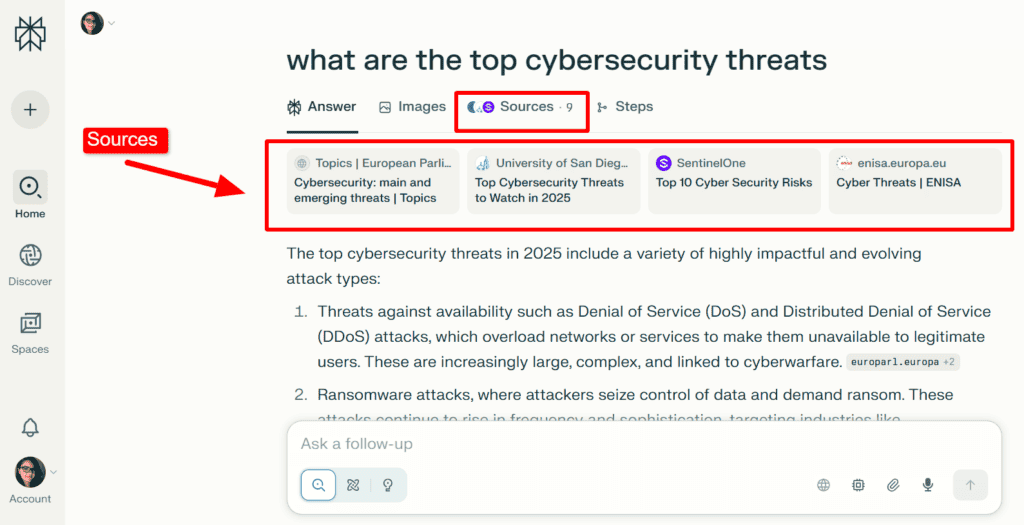
Advanced models include:
- Gemini 2.5 Pro: Google’s newest AI for reasoning, coding, and multimodal capabilities.
- Sonar Large: Open-source model trained to work with Perplexity’s search engine.
- GPT-5: Expert reasoning, enhanced coding and writing, and faster responses.
- Claude 4.5 Sonnet: Strong coding, reasoning, and computer-use skills.
You can alsouse Perplexity AI’s Deep Research tool for deep learning.
For example, you can gather insights to better understand your competitors. If you use it for this purpose, consider using customer feedback tools as well. They’re super helpful for gathering customer opinions and understanding competitor performance.
What is ChatGPT?
ChatGPT is an AI chatbot that can chat, write, and assist with tasks such as coding and content creation. It generates answers from its built-in knowledge (from the data it was trained on)
and its language skills. It can understand questions, generate coherent text, and adapt tone or style.
But it typically doesn’t generate citation-backed responses.
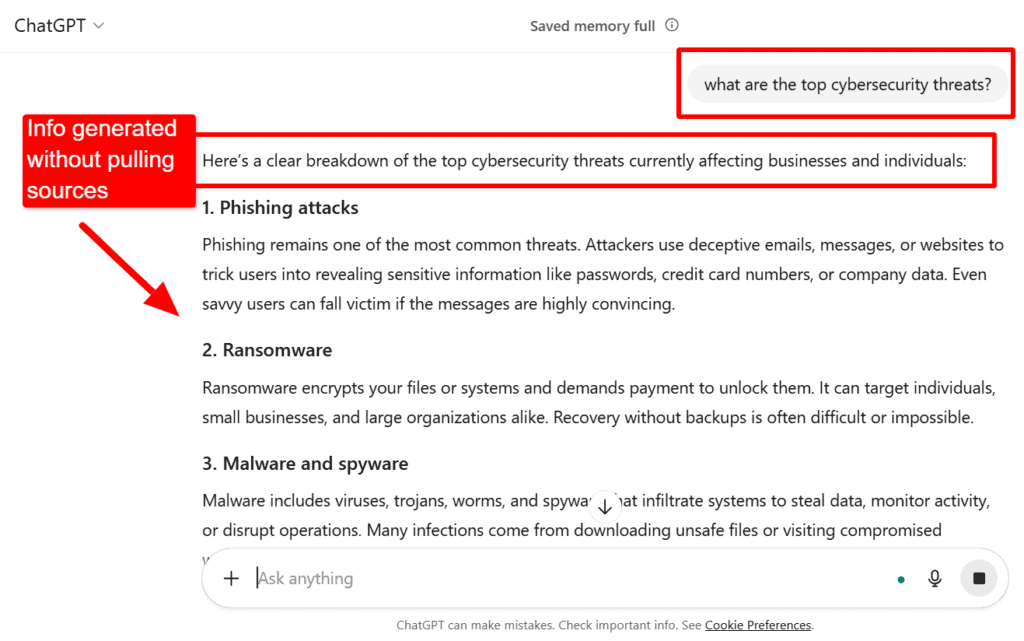
In some versions, ChatGPT can search the web for sources.
Though ChatGPT’s latest version (GPT-5) has reduced hallucinations, you should still always triple-check its answers — especially if you’re using them for important decisions, research, or anything that affects your business or clients.
Why is it important to keep an eye on the AI SaaS market?
The Artificial Intelligence SaaS market is projected to grow from an estimated 71.54 billion dollars in 2023 to 775.44 billion by 2031. 👇

Regardless of what industry you’re in,you risk getting left behind if you don’t stay informed about AI SaaS trends and innovations.
AI SaaS tools are transforming how businesses operate before our eyes.
They can help content creators, enterprises, and even small business owners:
- Create more efficient processes
- Improve decision-making
- Automate tasks
TL;DR: If you choose to ignore AI, it’ll come at a cost, including missing out on competitive advantages and opportunities to innovate.
What are the main differences between Perplexity AI vs ChatGPT?
The main differences between Perplexity AI and ChatGPT are:
- Sources vs storytelling: Perplexity focuses on providing quick facts with links so you can check the source. ChatGPT explains things in more detail and adds examples or opinions to help you understand.
- Fact-checking: ChatGPT can sometimes fill in the blanks, so it might guess or assume things (that may or may not be true). Perplexity tends to stick closer to what it finds online, which may make it better suited for fact-checking.
- Short vs detailed: Perplexity keeps answers brief and straight to the point. ChatGPT takes more time to explain and connect the dots.
- You can also have a conversation with it.
- Guidance: ChatGPT often adds tips or context to show why something matters to you. Perplexity mostly gives you facts and lets you draw your own conclusions.
Users use Perplexity AI for research and ChatGPT for context and creative purposes.
But use cases vary by user goals.
Speaking of which …
Which AI is better: Perplexity AI or ChatGPT?
It’s hard to say which AI is “better,” since they both have strengths and weaknesses.
TL;DR: It honestly depends on your goals. Read through the pros and cons below to weigh the two options. You might also find that you like both of them, but use them differently. More on that in a bit.
Pros and cons of Perplexity AI
Here are some advantages and disadvantages of using Perplexity AI. 👇
Pros
Here’s what’s working for Perplexity AI:
1. Perplexity AI cites its sources and has a web search capability that it always uses.
Perplexity AI relies heavily on sources when populating information.
If you’re writing a research paper or comparing industry competitors, it can help you pull data along with source citations you can reference in your content. This is helpful if you want readers to see where the information came from.
2. Perplexity AI handles complex, multi-step queries.
Perplexity AI can break a big question into smaller parts, search for answers to each part, and then combine them into a single clear response. (It’s like asking a smart research assistant to solve a puzzle, step-by-step.)
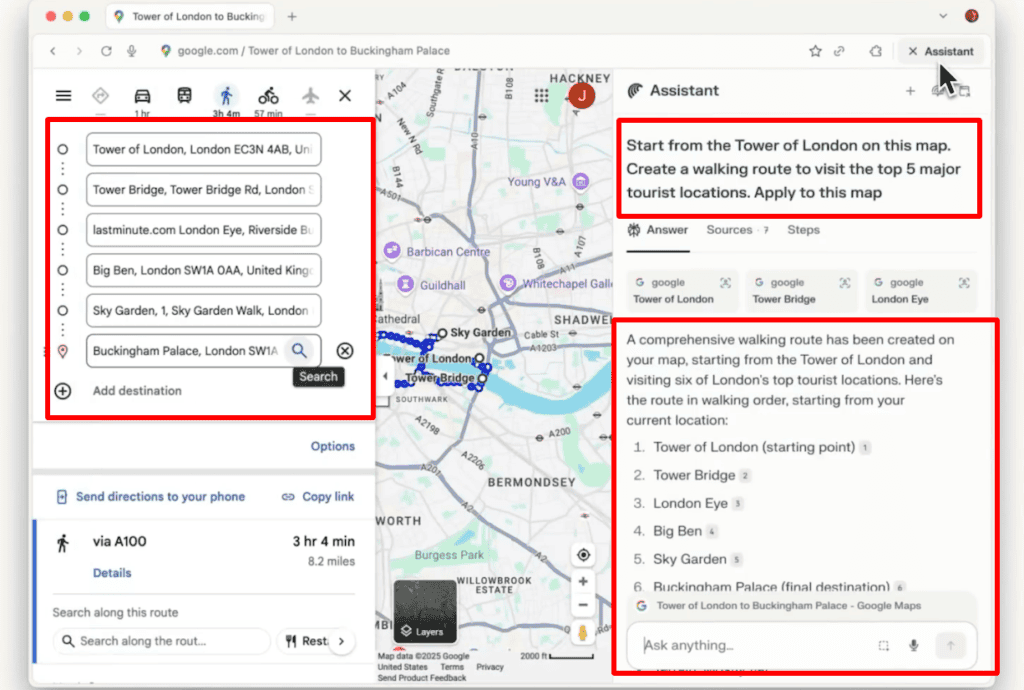
It’s a new tool, called Comet, that really acts like a personal assistant.
For example, you can use it to plan a walking route, and it’ll directly integrate with Google Maps inside the browser. It can search for top attractions or places of interest in a city, and then automatically map out the best walking route to connect them.
Here’s an example of how Comet helped to plan a London walking route:
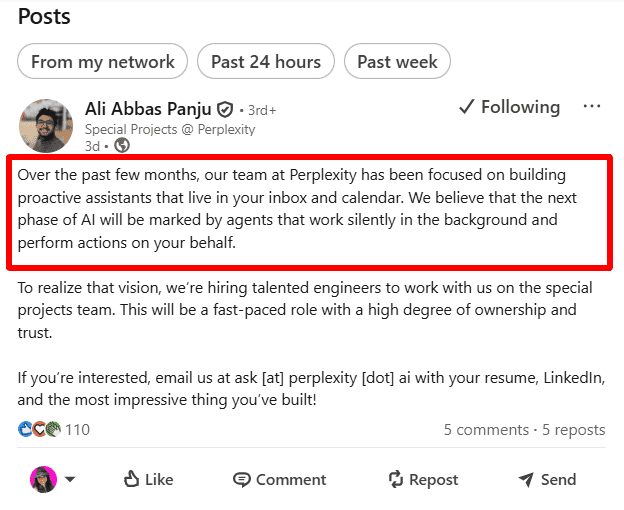
Ali Abbas Panju, the Head of Special Projects at Perplexity, also says proactive digital assistants that live in your inbox and calendar are on the way.
To compete with this, ChatGPT now lets you use apps directly within conversations.
Early partners include Booking.com, Canva, Coursera, Expedia, Figma, Spotify, and Zillow. This launch opens new possibilities for users and developers alike.
3. Perplexity AI tries to lean on facts by generating information from recent sources
Perplexity truly does try to be factual when generating its responses. It also pulls data from the most recent sources, so you have a better chance of getting accurate information.
ChatGPT tends to hallucinate more, so its “facts” aren’t as reliable.
Cons
Here are some cons to be aware of when you’re using Perplexity AI:
1. It’s still not a completely reliable information source.
Perplexity isn’t 100% reliable, even though it cites sources. It pulls information from the web in real time, so its accuracy depends on the quality of the sources it finds.
So while Perplexity helps you see where information comes from, you should still double-check key facts. (Especially if the answer comes from blogs, forums, or unknown websites.) It’s great at gathering and summarizing data, but not as a final authority.
2. It can’t read your mind, and you can’t train it, so you may not like its suggestions or final output.
Even with its personal assistant, Perplexity AI is still a bot that performs based on the information it finds and the prompts you give. It won’t automatically know your preferences or goals.
Perplexity AI and Comet also use pre-trained AI models. You can customize Comet for tasks, but you can’t train or fine-tune the underlying AI yourself.
3. Answers can vary over time, and there’s less control over response style or tone.
Because Perplexity leans heavily on real-time sources, the same query can return different answers at different times.
You also have limited ability to adjust the tone, format, or creativity in its responses. This makes it less flexible for tasks like storytelling, persuasive writing, or marketing copy.
It’s also not as strong in long, flowing conversations. Follow-up questions sometimes feel more rigid or fragmented.
Pros and cons of ChatGPT
Here are some advantages and disadvantages of using ChatGPT. 👇
Pros
Here’s what’s working for ChatGPT:
1. A useful tool for professional writers and marketers using it for content creation.
ChatGPT can be super helpful for drafting outlines and pulling research for content marketing purposes. It can help you beat writer’s block by suggesting hooks, headlines, and main topics for your content.
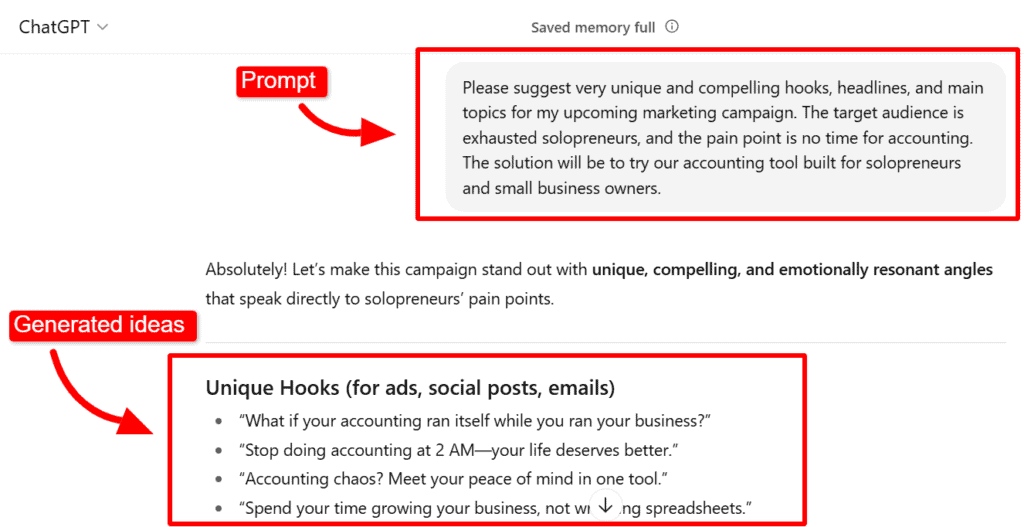
You can also use it as a grammar checker or to create rough content drafts.
I also find the user interface cleaner and more intuitive. That said, it doesn’t take long to learn how to use Perplexity AI, in my opinion.
2. Adapts to detailed prompts and context.
ChatGPT “wants” to be helpful. 😂 You can tell by the way it was trained to speak to its users. If you feed it the right prompts and instructions, it can work with you to generate text that’s close to what you’d want.
For example, you can train it to prepare persuasive hooks for your ad campaigns. Or to rephrase a formal paragraph into one that’s more reader-friendly.
It can also perform a data analysis to help you create lists and organize ideas.
For example, you can tell it the meals you’d like to cook, and it’ll estimate the ingredients you might need.
Or you can give it travel ideas with pros and cons, and it can organize them into a clear, easy-to-read comparison, so you can make decisions faster.
3. Great for conversational answers and depth.
You can straight up have a long, deep conversation with ChatGPT. And about anything under the sun. (I often think of it as a conversational AI chatbot.)
You can talk about your recent diagnosis with your doctor and how to cope with it. You can ask its opinion about a relationship problem you’re currently working through. Or you can just say “hey” and start an informal back-and-forth banter.
For one, this is a great use case if you just need someone to talk to outside of your immediate circle.
But you can also uncover deeper meaning about certain subjects you’re curious about or need to prepare content for.
For example, if you need to prepare a marketing campaign about accessibility tools, you can discuss the common struggles disabled people face. From the dialogue, you can uncover how disabled people cope with their disabilities, what tools they generally use, and what they still need support with.
Then, use prompts and ask it to give you hooks or campaign ideas using a problem + agitate + solution framework.
Cons
Here are some cons to be aware of when you’re using ChatGPT:
1. Not a 100% trustworthy tool for content generation or grammar checking.
While you can train ChatGPT and use AI writing prompts to guide its generative text, it’s still not a trusted writer or grammar checker.
(You should always double-check its text for hallucinations and edit each output to make sure the grammar and style are correct.)
If you’re looking for an excellent free grammar checker, try QuillBot. It specializes in checking grammar.
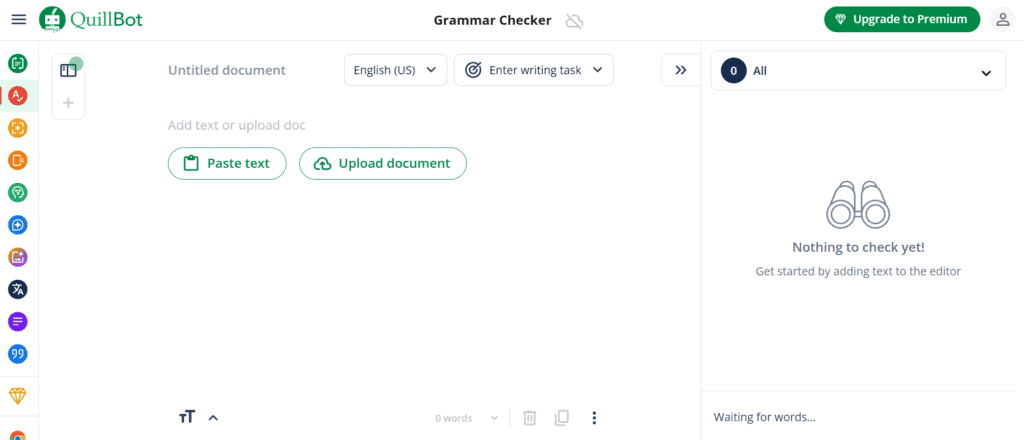
For a high-end, paid grammar checker, try Writer. (Great for online writers.)
2. It can be frustrating when it still doesn’t give you what you want.
I’ve trained ChatGPT for years — and it still messes up daily.
No matter how many detailed prompts I feed it, I still have to work with it back and forth to generate a decent response. Even then, I have to heavily edit the output. It’s never perfect or 100% on brand, and I care deeply about producing valuable content.
The worst part is, sometimes it doesn’t follow instructions, no matter how many times I prompt it or refine the prompts. At that point, I give up and just prepare the text or list myself.
It also has a knowledge cutoff, so I always have to do more research beyond generative AI tools.
3. You can tell it’s been trained to only respond in certain ways.
While ChatGPT is much better with nuanced topics than Perplexity AI is, you can still tell there’s someone behind the scenes who’s taught it how to respond.
This can make it seem biased toward certain topics. Or that it’s biased toward how you feel and would like it to answer you.
For example, if you voice a frustration, it may lead to empathy rather than bringing up deeper questions you should consider, too. This can reinforce what you already think instead of offering a more big-picture, well-rounded response.
On the flip side, it may be overly opinionated. Meaning it may continue to give you the same “advice” instead of recognizing that there’s more nuance to that topic.
When to use Perplexity AI vs ChatGPT
Both options are question-answering AI tools. But if you need current, verifiable facts, market research with sources, or follow-up questions on technical topics, Perplexity is often better.
If you want creative writing, conversation, explanations, tutoring, or content building, ChatGPT tends to shine.
Many users combine these AI search tools.
Your best bet is to test both AIs for your specific tasks. Run pilot tests using sample queries and check for:
- Response relevance
- Conversational flow
- Accuracy
TL;DR: You might choose Perplexity for fact-checking and real-time sources. And use ChatGPT to elaborate on a concept or to refine your writing tone. You can also use ChatGPT if you value engaging conversations, creative outputs, and nuanced understanding. Test both of them to find what works best for your tasks!
Wrap up
Long story short, both AI tools are helpful, but how you use them depends on your unique needs. You’ll likely find a use case for both tools, but test them out to see how they compare and go from there.
Also, don’t forget to optimize for AI SEO if you have a website or create marketing content. This is a growing frontier, and you don’t want your brand to miss out on being cited because you don’t have a strategy.
If you need help, uSERP can conduct an AI SEO audit and help you optimize your campaigns for both traditional SEO and AI search engines. Book a call with uSERP to get started!
FAQs: Perplexity AI vs ChatGPT
Here are some common user questions people ask about each AI tool’s content generation and search capabilities:
What is the main difference between Perplexity AI and ChatGPT?
When answering user queries, Perplexity AI focuses on real-time, source-backed factual answers using live web search. ChatGPT focuses on versatile, conversational, and creative tasks with a larger context window.
Both are AI-powered assistants.
Which AI is more accurate, Perplexity or ChatGPT?
Perplexity generally achieves higher factual accuracy and lower hallucination rates due to its live information retrieval. It may be better for fact-critical tasks. It also generally has better source material.
Can ChatGPT access real-time information like Perplexity AI?
ChatGPT requires explicit activation of the browsing mode to access real-time data. Perplexity AI integrates live web search by default.
Is Perplexity AI free to use?
Yes, Perplexity offers a free version with core features, as well as a paid Pro plan with advanced tools. ChatGPT also offers free access with paid tiers for advanced models.
Which AI is better for coding help, Perplexity or ChatGPT?
ChatGPT is generally better for coding assistance due to its strong generative capabilities and conversational debugging support. But test both tools out for product design to see for yourself.