Your URL might look simple, but it’s one of the most powerful parts of your website. A clear, logical structure helps people trust your content and allows search engines to understand what each page is about.
When your URLs are long or full of random characters, both users and crawlers get confused. That can hurt your visibility and your rankings.
In this URL structure SEO guide, you’ll learn how to create URLs that work smarter. We’ll walk through the basics, from structure types and keyword use to audits. You’ll also see how small fixes, like using hyphens, can make a big difference in how your pages perform in search.
By the end, you’ll know how to create clean, SEO-friendly URLs that attract clicks and keep your site organized.
Highlights
- URL structure is a direct ranking factor — research from Backlinko shows that pages ranking first on Google have URLs that are, on average, 9.2 characters shorter than those in tenth place, and the average top-10 URL is around 66 characters, making concise, descriptive URLs one of the easiest SEO wins available.
- The seven URL best practices for 2026 are: keeping URLs short and descriptive, using keywords naturally rather than keyword stuffing, enforcing HTTPS with a valid SSL certificate, handling duplicate content with canonical tags, maintaining a logical folder structure, using hyphens instead of underscores, and removing stop words and unnecessary file extensions.
- Choosing the right URL structure type depends on site size and complexity — hierarchical structures suit large eCommerce or multi-location sites where category depth matters, flat structures work best for small sites that need simplicity, and static URLs should always be favored over dynamic, parameter-heavy URLs to avoid duplicate content and crawl inefficiency.
- Regular URL audits — at least twice a year — are essential for maintaining SEO health, using tools like Screaming Frog, Ahrefs, and Google Search Console to catch broken links, redirect chains, duplicate content, and HTTP status code errors before they compound into larger ranking problems.
- Clean URLs build user trust and improve click-through rates, particularly on mobile devices and social platforms where long or character-heavy links look suspicious — a readable, keyword-relevant URL signals to both users and search engines that your content is credible and worth clicking.
What is an SEO-friendly URL?
Your uniform resource locator (URL) is your webpage’s address. It’s the bridge between your content and your visitors. When your web address is clean and descriptive, it helps both humans and crawlers make sense of it.
The parts of a URL
A URL has several key parts. Each one helps search engines and users understand what your page is about. Getting these right is a small but important part of search engine optimization.
Protocol. This shows how data travels between a visitor’s browser and your website. You’ll often see either hypertext transfer protocol (HTTP) or hypertext transfer protocol secure (HTTPS) at the start of a web address. Always use HTTPS. It encrypts your connection, builds user trust, and tells Google that your site is safe. You’ll need an SSL certificate to enable it.
Domain name and top-level domain. This is your site’s online identity. The domain name tells people who you are, and the top-level domain, like .com, .io, or .org, shows your category or region. For example, userp.io has “userp” as the domain name and “.io” as the TLD.
Folder structure. This shows how your site’s pages are organized. It works like folders on your computer. A clear folder structure helps both people and search engines follow your content path easily: example.com/blog/url-structure-seo.
File extensions. Older websites used endings like .html or .php to show file types. Modern content management systems don’t need these anymore. Keeping them out makes your URLs cleaner and easier to read.
URL parameters and fragments. These are extra details added to a URL, usually after a question mark or hash symbol, like example.com/shoes?color=red. They help track sessions or apply filters. But use them sparingly. Too many URL parameters can lead to duplicate content and confuse search engines.
Why URL structure impacts rankings
A clean, simple URL helps both people and search engines. It signals to Google what your page is about and makes your content easier to trust and share. Well-structured URLs also improve crawl efficiency, which helps your pages get indexed faster.
In fact, research from Backlinko found that pages ranking in the top spot on Google typically have URLs that are 9.2 characters shorter than those ranking in tenth place. That small difference can affect how easily users notice and click on your links.
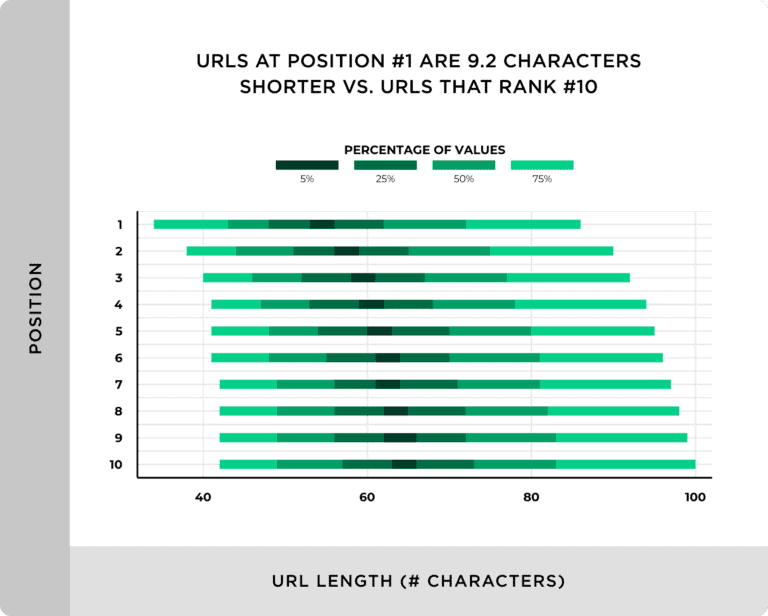
Short, descriptive URLs often earn more clicks in search results because they’re easier to scan at a glance. They also perform better across mobile devices and social platforms, where space is limited.
Types of URL structures
Your site’s architecture shapes how both users and search engines navigate your pages. Choosing the right URL structure makes your site easier to manage, crawl, and rank. Here are the most common types and when to use each.
Hierarchical URL structure
A hierarchical URL structure organizes content in layers, much like folders on your computer. It uses a parent/child structure to show how pages relate to one another.

This setup works best for larger sites with many categories, like eCommerce stores or service-based websites with multiple location pages. It helps visitors see where they are on your site. Search engines can also see how your content is grouped. A clear folder structure also improves internal linking, helping to distribute link authority across related pages.
Flat URL structures
A flat structure keeps every page on the same level. It’s quick to set up and easier to manage for small businesses’ websites. It also helps keep URLs short, which is great for sharing links on mobile devices and social media.

However, this simplicity has limits. As your site grows, it becomes harder to organize content logically. Without categories or folders, visitors and crawlers might struggle to understand how your pages connect.
Dynamic vs. static URLs
Dynamic URLs are automatically generated and often include dynamic URL parameters such as ?id=1234 or &sort=asc. These can confuse crawlers, cause duplicate content, and make tracking or indexing less efficient.

Whenever possible, use static, descriptive URLs (like example.com/product/women-shoes) that show what the page is about. They’re cleaner, more trustworthy, and easier to share. If your site needs dynamic URLs, manage them in Google Search Console or use canonical tags to prevent duplicate content and maintain SEO performance.
Best practices for URL structure for SEO in 2026
Let’s look at the current best practices for URL optimization that improve both rankings and user engagement.
1. Keep URLs short and descriptive
Short URLs perform better across search engines and social platforms. They’re easier to share, remember, and read on mobile devices. A short, clean link also looks more trustworthy in search results.
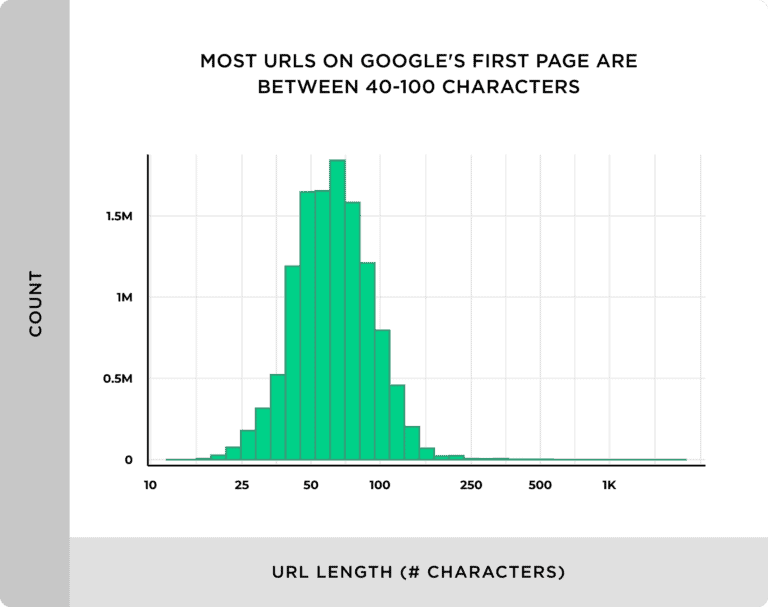
According to Backlinko, the average URL length for a top 10 result is around 66 characters. Keeping your links concise helps search engines understand the main topic more quickly and improves click-through rate.
Example:
- Bad: example.com/blog/the-ultimate-guide-to-url-structure-seo-in-2026
- Good: example.com/blog/url-structure-seo
Keeping it short helps users understand the page topic at a glance.
2. Use keywords wisely
Using keywords in URLs helps search engines understand what topic you’re targeting. It also tells users they’ve found the right place. But don’t overdo it.
SE Ranking says that overusing keywords can make pages look manipulative to search engines. Instead of helping your rankings, it can signal poor quality or over-optimization.
Keep your keywords relevant and natural. Choose one main keyphrase that best describes your page and place it near the start of the URL, if possible. This keeps your link simple and focused. It also improves how your page appears in search results and makes your content easier to find and share.
Example:
- Bad: /seo-keyword-guide-seo-keyword-2026
- Good: /url-structure-seo-guide
3. Use HTTPS and maintain your SSL certificate
Always use HTTPS. It protects user data, builds user trust, and helps your site rank better. Google uses this (security) as a small ranking factor, the Search Engine Journal reports. So switching from HTTP is worth it.
If your site still runs on HTTP, upgrade now and install a valid SSL certificate.
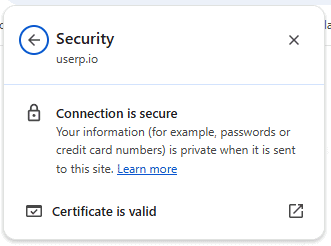
Additionally, the padlock next to the web address indicates that the site provides a secure connection. And, Visitors are more likely to stay, engage, and buy when they know your site is secure.
4. Handle duplicate content with canonical URLs
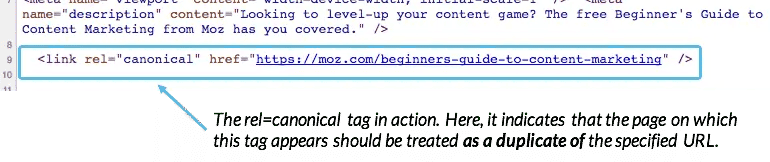
Duplicate pages can confuse search engines and waste your crawl budget. Use canonical tags so that search engines can identify the original version of a page. That way, your SEO efforts can focus on the right page. It also ensures that your main page gets full credit for traffic and ranking.
This is especially important for e-commerce sites with faceted navigation or site search results. These setups often create multiple versions of the same page.
5. Maintain a logical folder structure
A clear folder structure shows how your pages connect and makes it easier for crawlers to navigate. Think of it like a map that guides people to the information they need. For example, a folder like /products/ indicates that the page belongs to your store section.
And, when your structure is organized, it improves internal linking and supports your link-building strategy.
Example:
- Bad: /index.php?id=45
- Good: /services/seo-strategy/
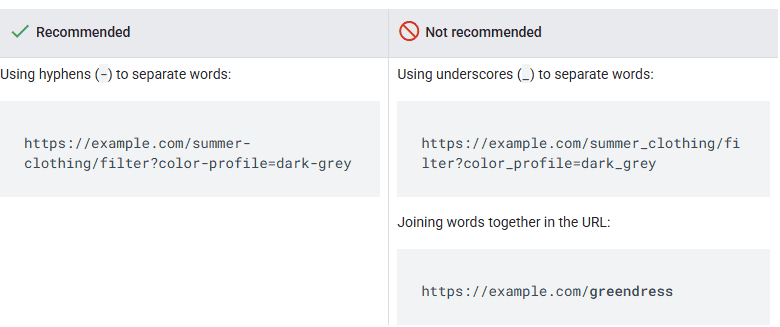
6. Use hyphens instead of underscores
Google recommends separating words in URLs with hyphens (-) instead of underscores (_). Hyphens make it easier for both users and search engines to recognize individual words and understand the page’s concept.
Underscores, on the other hand, are often used in programming to connect terms that belong together. Because of this, Google doesn’t treat underscores as word separators.
7. Avoid stop words and file extensions
Avoid short filler words like “and,” “for,” or “of.” They make URLs longer without adding value. Also, skip unnecessary file extensions like .html or .php. Most modern platforms don’t need them, and leaving them out keeps your URLs clean.
A URL like /about-us is easier to read and remember than /about-us.html. The cleaner the link, the better the user experience and search engine ranking.
How to audit and optimize your URLs
Regular URL audits help you catch issues early and keep your website running smoothly. They also ensure your pages stay easy to find and perform well in search engines.
Audits are the first thing in our SaaS SEO checklist.
Use SEO tools to find URL issues
Start your audit with reliable SEO tools. Platforms like Ahrefs, Screaming Frog, and Google Search Console can help you spot duplicate content, long URLs, and broken links. They also show how your URLs appear in search results and how each affects your search engine ranking.
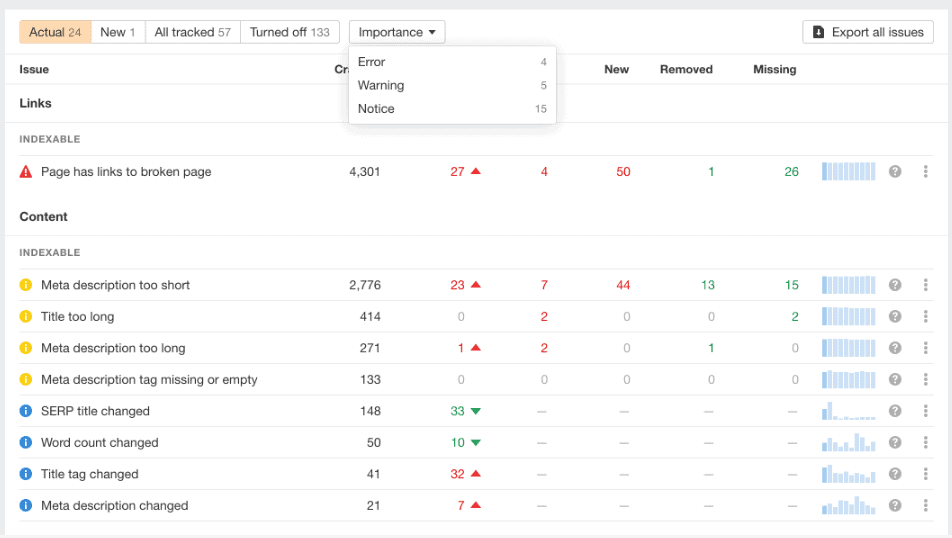
Even a small website, like a podcaster’s website, can benefit from a simple URL audit. It helps ensure every page or episode link works correctly and reaches your audience.
Fix broken links and redirect chains
Broken links and redirect chains waste link equity and frustrate users. Check for 404 errors, broken redirects, or incorrect HTTP status codes. When removing or updating pages, always set up a 301 redirect to guide visitors and preserve link-building value.
Clean redirects keep your website domain strong and trustworthy. They also protect your user experience, ensuring visitors always land where they expect.
Measure performance with analytics
After fixing issues, monitor how your URLs perform. Use website analytics tools to track your click-through rate, organic traffic, and engagement metrics. These numbers show if your URL optimization efforts are paying off.
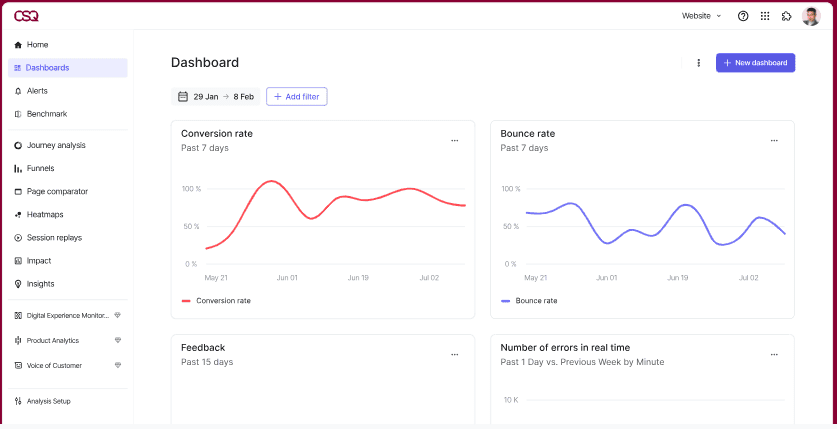
Over time, analyzing performance helps you find patterns. You’ll see which URLs attract the most visitors and which need attention. This process keeps your site healthy, organized, and ready to rank.
Wrap up
A good URL does more than tell people where to click. It builds trust, supports your SEO strategy, and helps every page on your site perform better.
As you’ve seen in this URL structure SEO guide, even small tweaks, like shortening your URLs, adding keywords naturally, and keeping a clear folder structure, can make a noticeable impact. Descriptive URLs not only improve rankings but also make your website easier to manage and share.
If you’re ready to strengthen your SEO and earn more organic traffic, partner with uSERP. Book a call today to learn how our link-building and content strategies can help your site rank higher and grow faster.
FAQs
1. What makes a good URL structure for SEO?
For on-page optimization, the URL should be short and descriptive—easy to read for users and search engines. It should include relevant keywords and avoid extra characters, numbers, or symbols.
2. Does using keywords in URLs help with SEO?
Yes, using keywords in URLs helps search engines understand what you’re talking about. It also reassures users they’re on the right page. Keep it natural and avoid keyword stuffing, and use one main keyword that matches your topic.
3. How often should I audit my website URLs?
At least twice a year. Or more often, if you’re publishing content regularly. Use tools like Screaming Frog, Ahrefs, or Google Search Console to address technical SEO issues, like broken links or missing redirects. This also applies if you have a small business website, as audits ensure your website domain is healthy, well-organized, and ranks well in Google Search.