




There’s no limit to what engagement employees can achieve together.
Unfortunately, most employees are either not engaged or fully disengaged at work. (More on this below.)
Remote teams have even more barriers. Team members often live in different time zones and have various schedules.
So, how often do you meet? And for how long? And to do what?
That’s where virtual team engagement activities can be helpful. Below, I’ll show you how Together, Kumospace, and Shopify use virtual team-building activities to bring employees together and sharpen engagement. 👇
Highlights
- Nearly 80% of employees worldwide aren’t engaged or are actively disengaged at work.
- Together boosts morale with weekly or bi-weekly virtual coffee chats and employee matching.
- Kumospace teams improve communication by working in virtual offices and taking informal breaks, such as playing chess.
- Shopify strengthens trust with weekly asynchronous culture-building prompts sent through Slack.
- eNPS scores, surveys, and turnover rates are the top ways to measure the effectiveness of virtual engagement.
Why is employee engagement important?
High employee engagement benefits your company and everyone you work with.
Gallup’s workplace engagement data shows that engaged employees:
- Stay longer and show up more often.
- Are more productive and profitable.
- Promote better customer loyalty.
- Have fewer safety incidents.
- Have a higher well-being.
- Participate more.
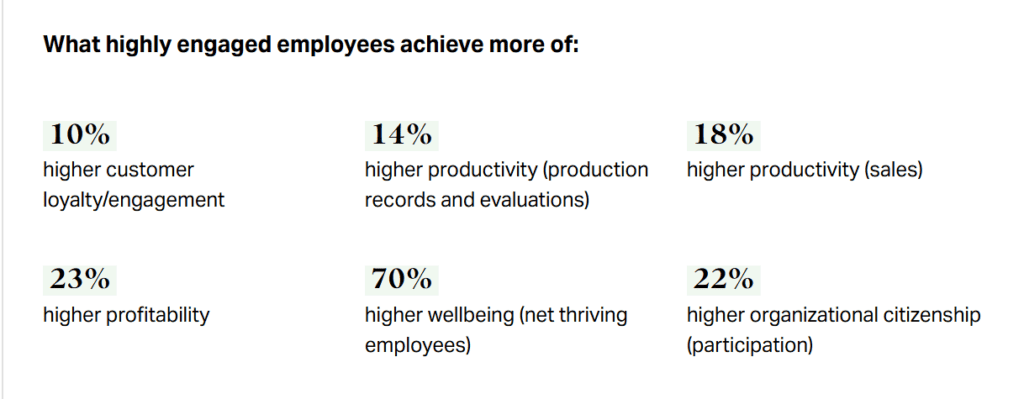
Gallup’s report also notes that disengaged employees are unhappy at work — and even act out their discontent. The report states they’re resentful and may be harmful to team morale and outcomes.
What’s even more shocking is that almost 80% of employees worldwide aren’t engaged or are actively disengaged at work. (Even when companies try to nurture employee engagement.)
Still, some companies have been successful at strengthening employee participation with virtual team-building activities.
Let’s take a look at what’s working below. 👇
Virtual coffee chats
Virtual coffee chats are pretty self-explanatory. Your team meets virtually, with coffee in hand (or another bevvie), to chat and shoot the breeze.
But you can also use software to help facilitate this, like Donut. Some tools will help your team schedule chats, send reminders, and even match employees with one another.
Poll your team to see what works for them regarding scheduling, but keep it consistent.
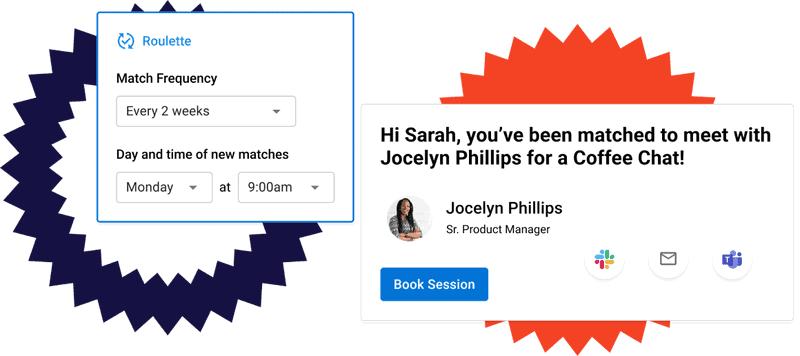
The team at Together, for instance, implements weekly or biweekly virtual coffee chats to help strengthen employee morale and active company participation.
“Some employees may prefer monthly virtual gatherings to start, if the commitment to weekly or bi-weekly meetings is too overwhelming. However, to get the most out of the organic connections formed during virtual coffee breaks, we recommend a weekly or bi-weekly schedule,” says Jai Chaggar, the Chief of Staff at Together.
As far as the length of each call, Jai says they usually stick to a half hour.
“The duration of a virtual coffee break should be long enough to make a meaningful connection, but not too long as to disrupt an employee’s workday. We typically find that 30-minute meetings are the sweet spot.”
Jai also recommends employee matching when facilitating virtual coffee chats. This pairs team members who might not normally interact.
It also encourages new connections, builds relationships across departments or locations, and helps foster a stronger, more connected team culture. Plus, employees don’t have to figure out who to meet on their own.
The Create & Grow team also uses virtual coffee chats.
“One way we’ve adapted inclusion strategies at Create & Grow for remote and hybrid work is by implementing structured virtual coffee chats and cross-team mentorship programs.
Remote work can make it easy for some voices to get lost or for informal networking to disappear, so these initiatives intentionally connect team members who might not interact naturally.
This approach has helped ensure everyone feels included in decision-making and company culture, regardless of location, and has strengthened collaboration and knowledge sharing across the team,” Georgi Todorov, Founder of Create & Grow, mentions.
More tips on how to use virtual coffee chats
Jai from Together recommends giving icebreaker questions to get the ball rolling. This can also help support introverted employees or team members who want to participate but don’t know how.
Try professional and casual themes.
For example, if you run an SEO team, you might ask: “What blog content marketing strategies are working right now? Or what SaaS SEO strategies are you excited to try?”
Here are some other ideas you can try for your virtual coffee chats:
- Choose a different host for each chat and ask them to prep questions in advance.
- Make these optional to avoid forced fun (but definitely encourage attendance).
- Challenge your team with an online game or online trivia quiz.
- Test problem-solving skills with a murder mystery game.
Virtual co-working and chess breaks in virtual offices
Virtual co-working in virtual offices is pretty new-agey. You and your team member work virtually inside a virtual office space, like the one below:
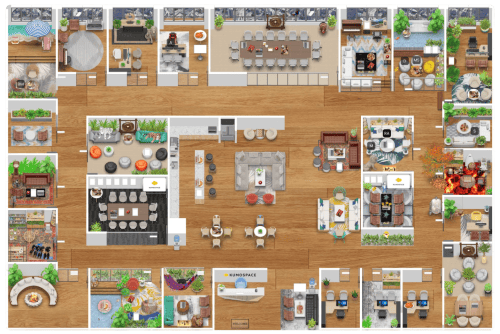
You can click around, head to a “meeting room,” open up files — you get the idea.
This helps teams break silos and communicate more easily. (Great for project management teams and product development teams, for instance.)
If coffee chats are about building the relationship, virtual co-working is about actually getting things done together.
Co-Founders Brett Martin and Yang Mou from Kumospace built virtual offices to solve their team’s remote challenges: poor communication and culture-building.
“Remote culture doesn’t get fixed by the one-off holiday party or happy hour. Trust is built over time through repeated interactions: Late nights over board games, lunch with the team, morning coffee with your fellow early-riser.
We needed to build a virtual environment where these serendipitous interactions occurred naturally throughout the course of the remote workday, just as they occur naturally in a physical office,” Brett and Yang mentioned in a recent article.
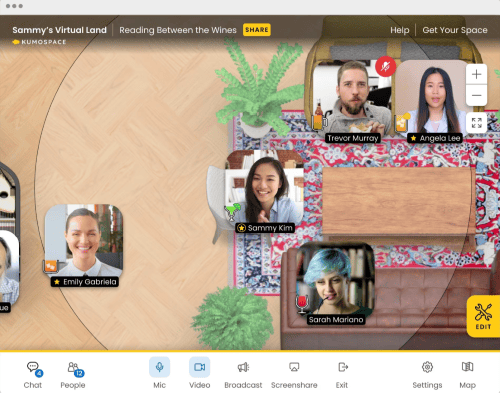
Brett and Yang had such a good experience coworking virtually with their team that they started sharing their approach with a few trusted partners.
What they learned pleasantly surprised them:
“They don’t just meet in Kumospace like you might in Zoom or Google Meet. They work in Kumospace.
They hang out before and after events, brainstorm on whiteboards, do focused work solo or together, and take breaks with a quick game of chess. It became clear that, unlike the existing video conferencing solutions, Kumospace was providing teams with something entirely different: A place to show up.
They showed up for themselves, for their teams, and for their companies. It was inspiring to watch!” Brett and Yang mentioned.
Does this mean your team has to play chess? No, but it’s definitely an option.
Here are some more tips on how to use virtual offices:
More tips on how to use virtual offices
Adapt your virtual office and co-working experience to your team’s needs and unique work style. Send a survey or poll out to everyone and ask about their co-working preferences.
Do they want to …
- Meet on Monday mornings for a virtual whiteboard brainstorming session?
- Share remote work schedules with peers in the same department?
- Meet every Thursday afternoon for a virtual book club?
- Host virtual team building bingo every Friday?
They’ll feel more connected to your environment by getting a say. That matters even more when you bring in outside engineers through IT staff augmentation services, since contractors who help shape these rituals settle into the team faster. And you’ll encourage higher participation rates.
Asynchronous culture-building prompts
Asynchronous (or async) culture-building prompts are questions or exercises that team members answer on their own time. They can help strengthen connections, trust, and team culture without needing everyone online at the same moment.
This is a great option if you and your team just don’t have the time to meet often.
Employees can participate between assignments, and you can read their responses in your free time to get to know them better.
Shopify’s engineering teams use these.
Since trust is one of Shopify’s top cultural values, engineering managers create async “trust-building prompts.”
These are customizable questions that they make and send to Slack using a tool called Geekbot. Prompts are sent to the team each week, and employees can respond to them right in Slack.
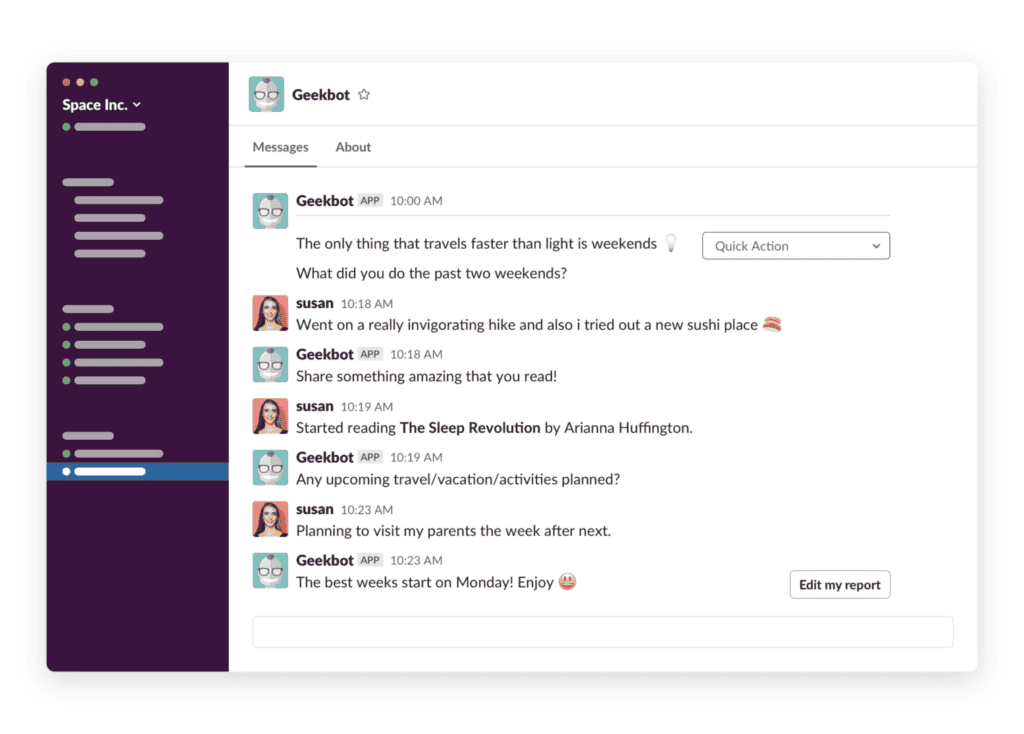
Lawrence Mandel, the Director of Engineering at Shopify, says:
“The details that people have shared about their lives have helped me get to know people as individuals (even when we can’t be together in person) and have brought a lot of humanity to my team.”
“This humanity has charged our trust batteries — and it has got the team working more effectively together.”
If you use these, keep them fun. They’re supposed to bring everyone together in a light-hearted way. (No politics, no religion.)
Try questions like: “What did you do last weekend that you liked most? Or has anyone tried a new drink or food recently? How was it?”
One group I was in talked about Vietnamese coffee experiences and recipes for three days!
More tips on how to use asynchronous culture-building prompts
Here are some more ideas you can try when you’re using async culture-building prompts:
- Keep questions open-ended: Encourage sharing with open questions. Experiment with questions like “What’s one small win from your week?” Or, “Share a hobby you enjoy outside of work.”
- Mix work and personal prompts: Alternate between project-related questions and personal-interest prompts. (To build both professional and human connections.)
- Encourage voluntary participation: Make it clear that answering is optional. This keeps engagement authentic and avoids pressure.
- Use a consistent schedule: Send prompts daily, weekly, or biweekly so team members know when to expect them. And even look forward to contributing.
- Celebrate responses: Acknowledge shared stories or insights in team meetings or Slack threads to reinforce connection and appreciation. Don’t be afraid to have a good laugh.
- Rotate question creators: Let different team members create prompts to bring fresh perspectives and increase engagement.
- Integrate with async tools: Prompts can get buried in email threads. Use platforms like Slack or Geekbot to collect responses in one place and let team members reply on their own time.
How to measure the effectiveness of virtual team engagement activities
The best way to measure the success of your virtual team engagement activities is to track your Employee Net Promoter Score (eNPS). This shows you if your employees are likely to recommend your business as a great place to work.
Questback has a free eNPS calculator you can use to get your score. Click the link above.
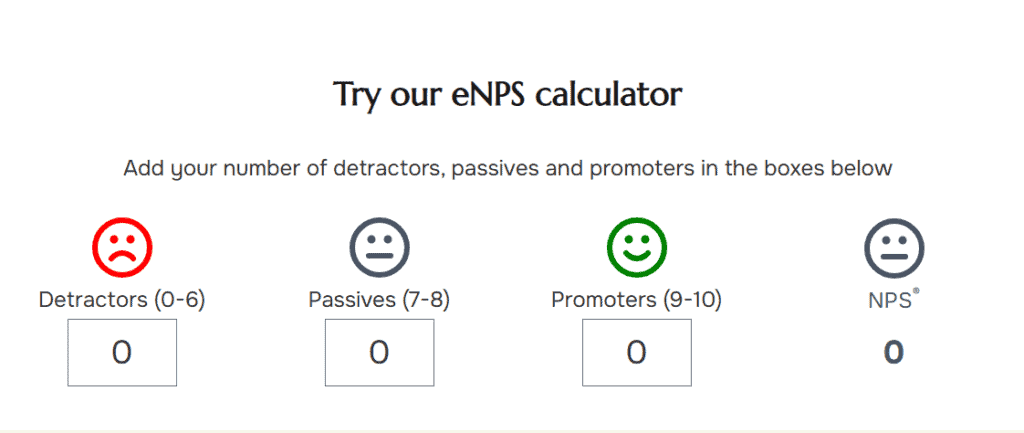
You can also track your company’s turnover rates, survey scores, and productivity metrics (like quality of work and how much work gets done).
Speaking of survey scores, definitely run polls and surveys often. Keep these short so they’re not overwhelming, and include both multiple-choice options and the option to write a custom answer. This gives you direct feedback you can analyze and learn from to better support your team.
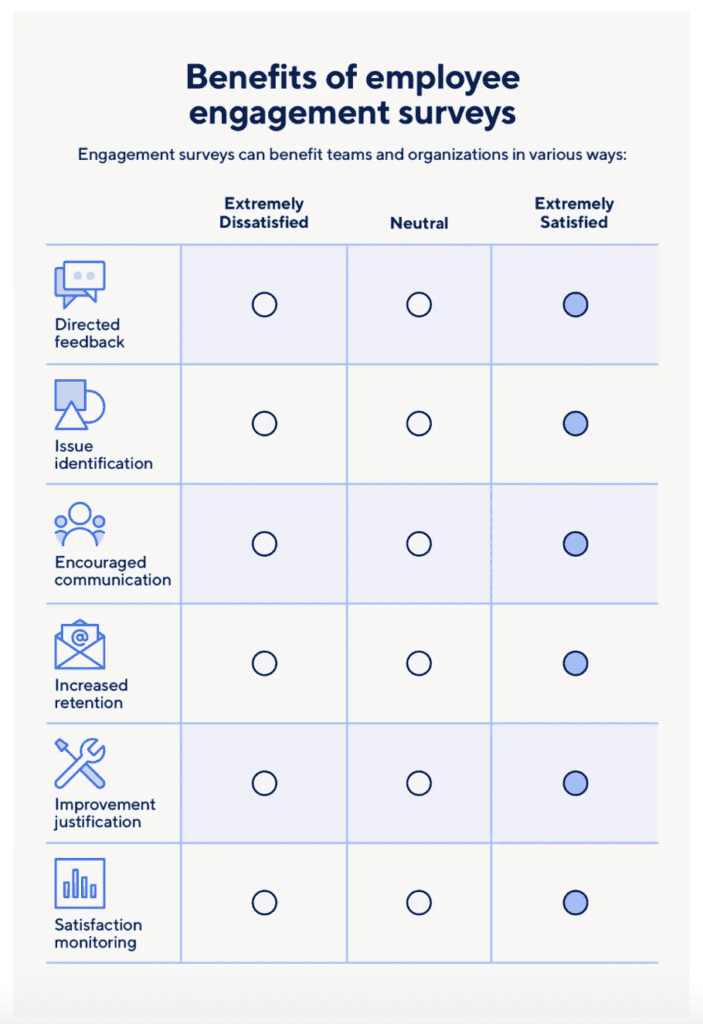
When possible, implement your team’s requests.
Or at the very least, test them! You won’t know if their suggestions are a good fit until you give them a chance.
Wrap up
Not to be corny … but you’re just a few plans away from having a more connected team. I hope this guide inspires you to pick one or two options from this list to try with your remote team soon.
If you’re pressed for time, start with the async prompts. If you want more real-time meet-ups, experiment with the coffee chats. And if you want full-out virtual camaraderie day in and day out, try a virtual office space.
Remember to poll your team along the way to see what they think! Implement their advice and keep experimenting with more ways to bring your team together.
PS: Want to start an employee advocacy initiative? We can help you put together an employee content marketing strategy. Book a call now to learn about content strategy, SEO, and digital PR support options.
FAQs
Does remote work naturally build team connections?
Not really.
Remote work misses those spontaneous hallway chats, casual visibility, and trust-building moments. Engagement activities help recreate (and even improve) those missing social and coordination layers. This can help support morale and keep people around long-term.
What kinds of virtual activities actually work for remote team building?
Some of the most effective virtual activities are asynchronous check-ins, virtual co-working, and casual virtual coffee breaks. Other options include virtual happy hour, virtual office games, and virtual trivia events. If you’re really brave, try a virtual reality event.
Should remote team-building always happen live?
Not always.
With time zones and busy schedules, asynchronous rituals may work better. They’re inclusive, save time, and don’t interrupt everyone’s day. (People can join on their own schedule but still feel connected.)
That said, you can still host weekly or biweekly syncs, such as virtual coffee chats, to foster real-time camaraderie.
How can managers encourage participation without making it feel forced?
Managers can:
- Tie them to real value like recognition, support, or problem-solving.
- Keep activities short and optional.
- Let people skip if needed.
- Rotate who leads.
*Pro-Tip: Don’t pile extra events onto full calendars. Know when to stick to async options.
What’s the real benefit of doing engagement activities?
Beyond making people feel good, engagement activities boost collaboration, communication, trust, visibility, and a sense of belonging.
This encourages higher productivity, better morale, faster problem-solving, less turnover, and stronger team cohesion over time.