




Building a small business website doesn’t have to be hard. Your site is often the first thing customers see. It needs to work for you, not against you.
This guide shows you how to build a small business website step by step. You’ll learn how to select a domain name, choose a website builder, and optimize your website for search engines.
Highlights
- Learning how to build a small business website starts with smart planning and the right tools.
- Choose a clear domain name, strong hosting, and a website builder that fits your needs.
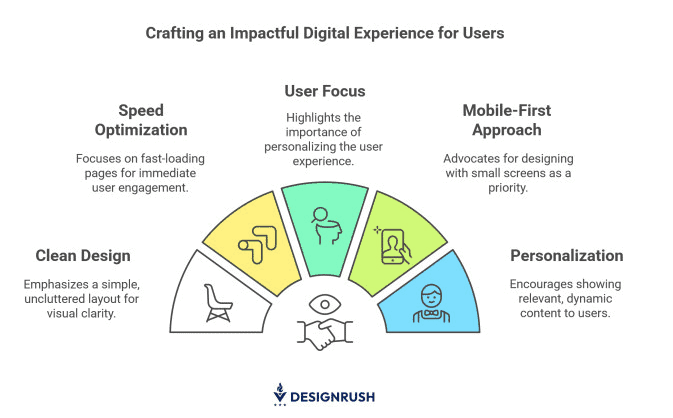
- Focus on design that loads quickly, looks great on mobile devices, and delivers a seamless user experience.
- Secure your site with SSL certificates to protect customer data and build trust.
- Keep improving with fresh content, analytics tracking, and regular updates to grow your online presence.
Why your small business needs a website
Your website is your digital storefront. It’s where customers learn who you are, what you do, and why they should trust you. Without one, your business is almost invisible.
First impressions happen in seconds. According to Hostinger Research, 94% of first impressions are made by design alone. A messy layout or slow loading time can quickly turn visitors away. In fact, 38% of people leave a site if it looks outdated or confusing.
A professional website builds credibility. People expect real businesses to have an online presence. When they can’t find you, they often move on to your competitors. A clean, user-friendly site tells customers you’re reliable and care about their experience.
Your website also works while you sleep. It answers questions, captures leads, and promotes your services 24/7. That’s how small businesses compete with larger ones, by being available anytime.
Visibility and trust go hand in hand. SEO helps people find you, while smart planning helps convert them into customers. When both work together, your website becomes one of your most powerful business tools.
Planning your small business website
Every great website starts with a clear plan. Before you build anything, know what you want to achieve and who you’re creating for.
Define your goals and target audience
Decide what your business website should do. Should it…
- Share information?
- Bring in leads?
- Sell products?
Your goals shape every decision, from layout to content.
Next, understand your target audience. Who are your ideal customers? What problems do they want solved? The better you know them, the easier it is to design content that meets their needs.
Plan your website pages carefully. Most business websites require a homepage, an about page, a services page, and a contact page. Add more based on your needs.
Finally, build a simple content marketing strategy. Create value for your audience first. When your content helps people, it builds trust. And that’s what keeps them coming back.
Choose your budget
When you set up a small business website, consider the costs involved. The cost of business websites ranges between $1,500 and over $70,000, depending on complexity, according to GoodFirms. And this is just for web development.
For basic sites, it can be on the lower end. If you’re adding more functionality, such as ecommerce stores with payment systems and inventory, the cost may increase.
One common mistake is trying to build everything at once. Many small businesses overspend early on features they don’t yet need. Start with the essentials first, then expand your website as your traffic, products, or customer needs grow.
If you’re on a budget, use website builders. Many have free plans. Paid plans usually cost $10–30 per month. These include hosting plans, templates, and tools.
Don’t forget about ongoing costs: domain names typically cost $10-20 per year, while web hosting often runs $5-50 per month, depending on your traffic and the features you require. The plan may also include free SSL certificates.
Step 1: Choose and register your domain name
Take your time to choose a domain name, as it will be your website’s address. Changing it later can hurt your SEO.
Keep it short and easy to remember. Avoid numbers, hyphens, or strange spellings. If your business name is available as a .com domain, claim it quickly.
Add a clear keyword if it fits naturally. A domain like lastnameplumbing.com helps search engines understand your site and supports technical SEO.
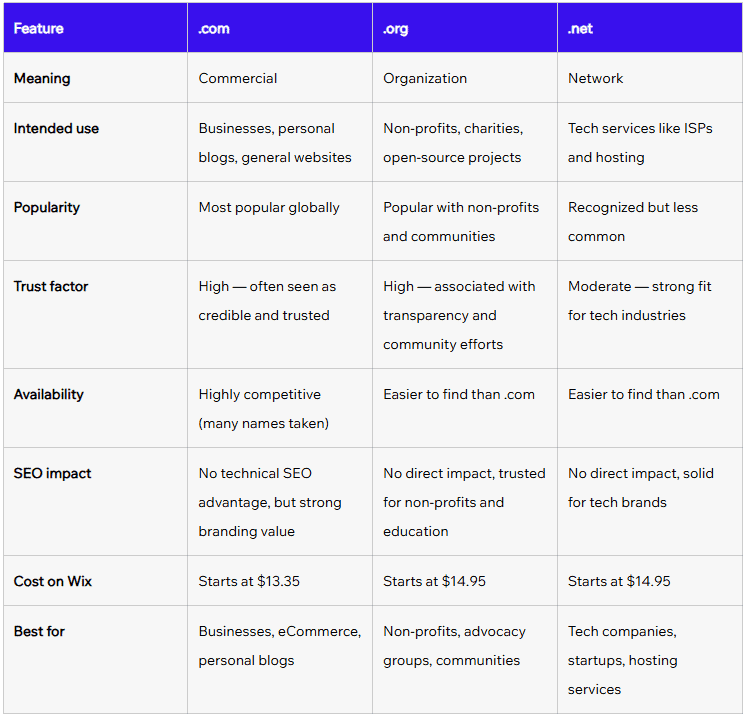
Stick with .com when possible. It’s the most trusted. Other extensions, such as .net or .org, work, but .com is best suited for businesses.
Buy your domain name from a reputable hosting provider that also offers web hosting. It simplifies setup and often saves money.
Register your domain name for at least two years to show search engines that you’re committed. Most hosting providers include domain privacy protection to safeguard your details.
Step 2: Select a reliable web hosting service
Web hosting stores your website content and makes it available online. Think of it as renting space on the internet.
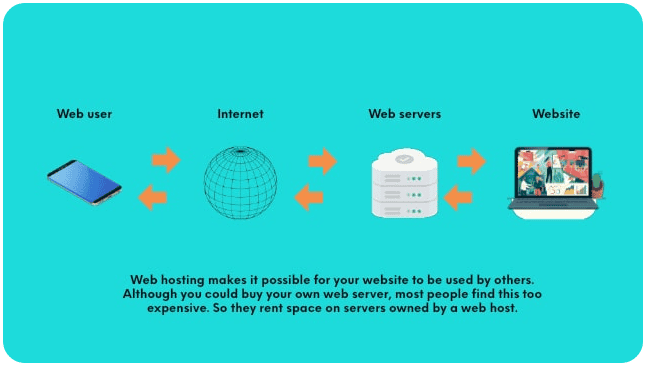
For most small businesses, shared hosting may be more affordable. VPS or cloud options offer greater speed and flexibility as you grow.
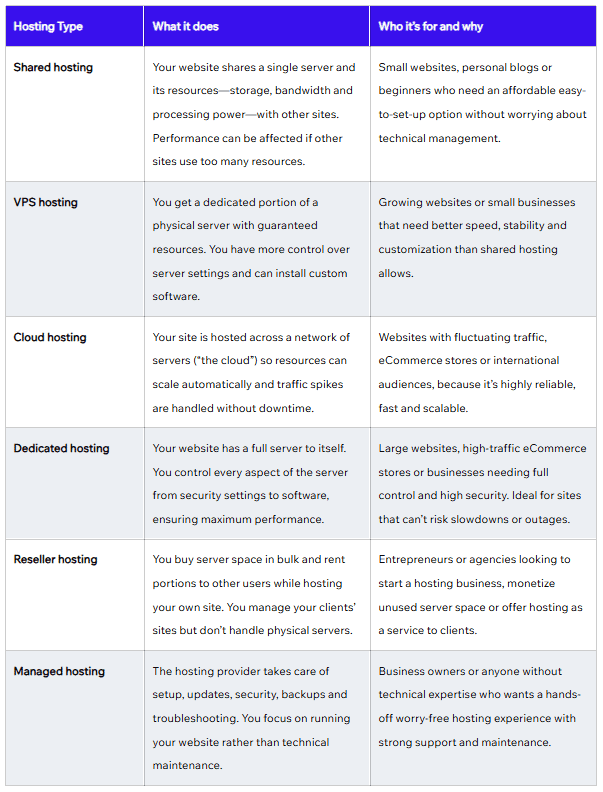
Select a web hosting company with fast servers and a 99.9% uptime guarantee. Server location matters too. Hosting near your target audience loads faster. Choose one with reliable 24/7 customer support.
The latest SEO technologies need fast, secure hosting. Your hosting provider directly impacts user experience and search engine rankings.
Step 3: Choose the right website builder or platform
Your choice of a website builder decides how easy it is to create and manage your site.
Website builders for beginners
Website builders like Wix offer drag-and-drop editors that eliminate the need for coding. They make it easy to build your first website. You choose what you need and place it where it fits best. Most of these editors also offer website templates you can later customize to match your style and brand.
For small businesses, Weebly offers ready-made templates and ecommerce tools that simplify setup. This is especially useful if you’re new to this.
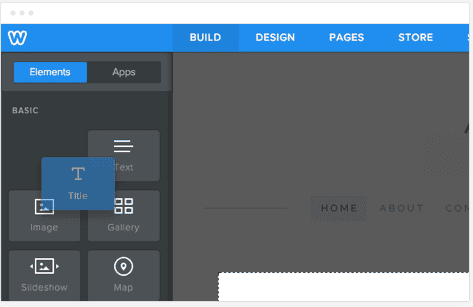
Both platforms handle updates, security, and hosting in the background. Most website builders also include built-in SEO tools that let you add meta descriptions, optimize images, and create SEO-friendly URLs.
WordPress and other CMS options
According to WPBeginner research, 43.4% of all websites use WordPress. This platform is flexible and works well for both blogs and ecommerce stores. You can install thousands of themes and SEO plugins to add features.
There’s a lot to learn, including themes, plugins, and maintenance, but you get far more control.
AI-powered tools for website creation
AI website builders create sites in minutes.
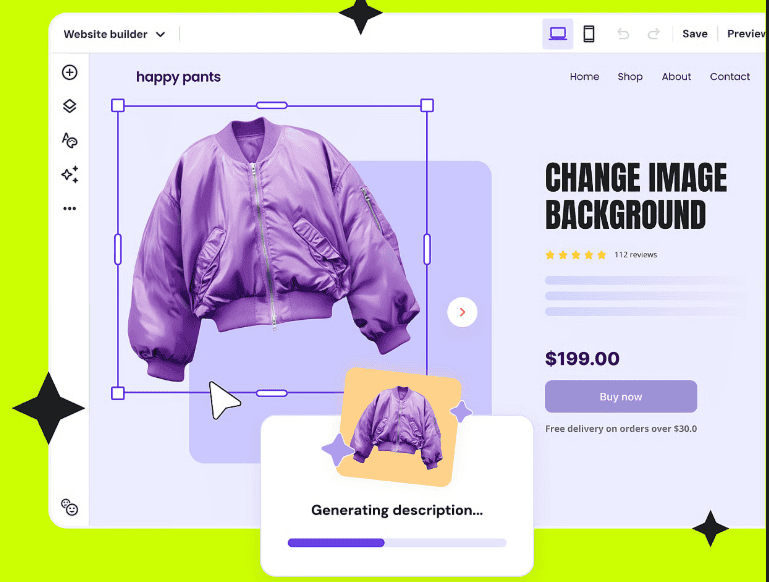
Tools like Wix AI, Hostinger AI, and GoDaddy Website Builder design layouts and write basic content fast. Still, AI-generated layouts and text should always be reviewed and personalized before publishing.
Once your setup is ready, the next step is making sure your website looks professional and feels easy to use.
Step 4: Design your small business website
A good website design looks great and works smoothly. If you’re figuring out how to build a business website that stands out, focus on design to draw visitors in and keep them exploring.
Select website templates or create custom designs
Website templates give you a professional head start. They’re pre-designed layouts you can adjust with your own content and branding. Most website builders organize templates by industry, so pick one that fits your business type. This saves time and ensures you have a strong design.
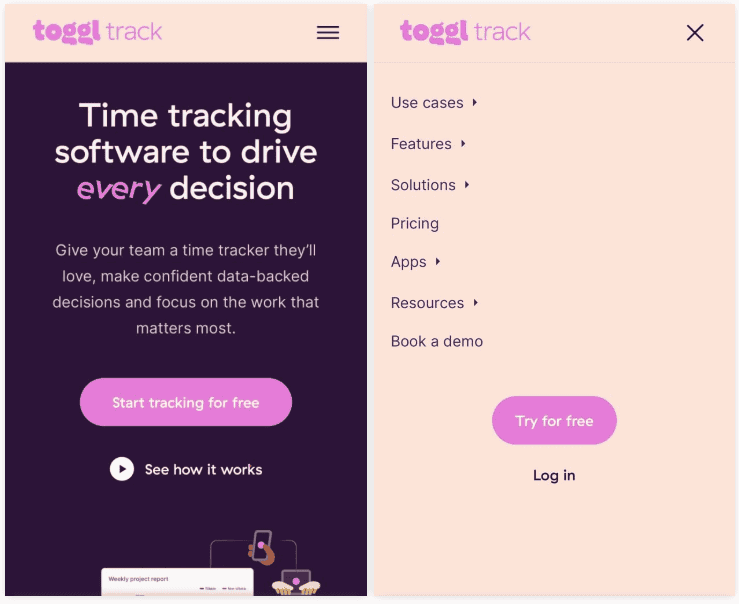
Professional website design should work well on all devices. Responsive layouts adjust automatically for phones, tablets, and desktops. Since most visitors use mobile, mobile optimization is key. Test your site regularly to ensure buttons, text, and menus are easy to use on small screens.
Create a consistent brand identity
Your website should reflect your brand’s personality. Use the same two or three colors throughout your pages. Choose fonts that match your tone. For example, Times New Roman works well for professional services. Open Sans suits modern, creative brands.
Use online tools to make a unique logo that fits your brand. It should look clear at any size and appear on every page.
Keep everything consistent. Use the same buttons, spacing, and image styles across your site. Consistency makes your site feel trustworthy and professional.
Optimize for user experience
A clear website layout makes it easy for visitors to find what they need. Keep your main menu simple and visible. Important content should appear above the fold, with your call to action front and center.
Guide visitors through your site with purpose. Each page should have a clear goal and a next step. Fast loading speed also matters. Compress images, limit heavy animations, and keep things simple to improve user experience.
Step 5: Create essential website pages
Every business website needs a few key pages.
Your homepage introduces your business. Explain what you do right away and why it matters. Highlight your main services or products and end with a clear call to action.
For most small businesses, each core page should answer a few simple questions clearly: what you offer, who it’s for, why someone should trust you, and what they should do next. That structure makes the site easy to scan and makes it obvious what someone should do when they’re ready.
Your About page tells your story. Share who you are and why you started. People buy from people they trust, and this page helps build that trust.
Service or product pages describe what you offer. Be specific about features, benefits, and pricing. Use clear descriptions and quality images.
A contact form makes it easy to reach you. Include space for a name, email, and message. Add your phone number and business email for extra convenience.
Include legal pages, too. A privacy policy and terms of service protect you and your visitors, especially if you collect customer data.
Finally, focus on SEO and content marketing. Each page should naturally target relevant keywords. Offer value first, then optimize.
Step 6: Implement security measures
Another important step to discuss in this ‘How to Build a Business Website’ guide is website security. It protects both your business and your customers.
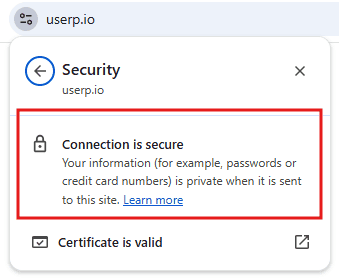
SSL certificates encrypt data shared between your site and visitors. They’re essential for any business website. Search engines favor secure sites, and browsers warn users when a site isn’t protected. That warning can quickly destroy trust.
When SSL is active, your URL shows HTTPS and a small padlock icon. This signal builds confidence and improves user experience. Most hosting providers include free SSL certificates. So activate yours as soon as possible.
Keep your website builder or CMS up to date. Use strong passwords and enable two-factor authentication. Regular backups help you recover fast if something goes wrong.
Follow privacy laws, such as GDPR and CCPA. Be clear about what data you collect and how it’s used. Secure sites also perform better in search engine results pages (SERPs), giving link-building strategies a stronger foundation.
Step 7: Optimize for search engines
SEO helps customers find your business website.
Start with keyword research. Look for terms your audience already searches for. Use Google Analytics or Google Search Console to see which keywords drive traffic and where you can improve.
On-page SEO shapes how search engines understand your site.
- Title tags explain what each page covers
- Meta descriptions appear in SERPs and can influence click-through rates
The most important thing is that you use relevant keywords naturally.
Structure content with headers. H1 tags mark the main title, and H2 or H3 tags break sections into clear topics. This improves readability and SEO.
Also, optimize images with descriptive alt text. It helps search engines and makes your site accessible.

Track results in Google Analytics to see what’s working. Many website builders now include built-in SEO tools that guide you through each step.
Step 8: Test and launch your website
Test your site carefully before going live. Check every page on phones, tablets, and computers. Different browsers, such as Chrome, Safari, and Firefox, display pages in their own unique way. So your site should look good on all of them.
Click every link to be sure it works. Broken links frustrate visitors and can hurt SEO. Test each form to confirm submissions reach your inbox.
After launch, start by testing the elements that most affect conversions, such as your main headline, call-to-action button text, and contact form length. Even minor tweaks can improve results.
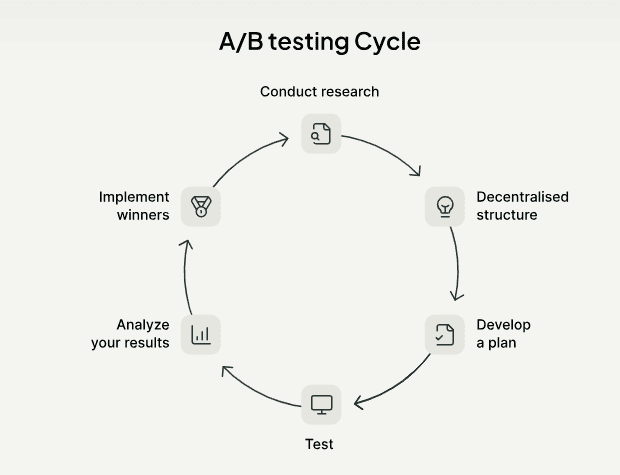
Do a soft launch first. Share your site with a few people and collect feedback. When everything appears to be in order, go public. Announce your launch on social media, email your customers, and follow a simple marketing plan to bring in traffic.
Maintaining your online presence
Launching your site is only the start. Keep it active and relevant.
Update content often. Add new blog posts, refresh product details, and replace outdated images. Search engines reward fresh content, and visitors notice it too.
Create a clear content strategy that fits your business goals. A simple content marketing schedule helps you stay consistent. Planning builds authority and saves time.
Check your analytics tools regularly. Monitor which pages attract visitors and where they tend to drop off. Apply what you learn to enhance your performance.
Stay connected with your audience:
- Be active on social media to build trust and visibility
- Use email campaigns to keep customers engaged
- Offer live chat or quick support options
Lastly, keep your Google Business profile up to date with accurate information, including photos, hours, and services, to attract local customers. Understanding how to build a business website doesn’t end at launch. It continues with maintenance, updates, and ongoing connection with your audience.
Ready to build your small business website?
Learning how to build a small business website takes planning, effort, and care. Choose a strong domain name, reliable hosting, and a website builder that fits your skills. Design with your audience in mind, keep your content fresh, and make sure your site is easily accessible on all devices. Every update moves you closer to a site that works hard for your business.
Want to get more visibility online? uSERP’s link-building services can help your business website rank higher and attract qualified traffic. Book your intro call now.